> ## Documentation Index
> Fetch the complete documentation index at: https://docs.atomicagi.com/llms.txt
> Use this file to discover all available pages before exploring further.
# Teams
> Group agents into reusable teams so multi-step work has a stable orchestrator and clear specialists
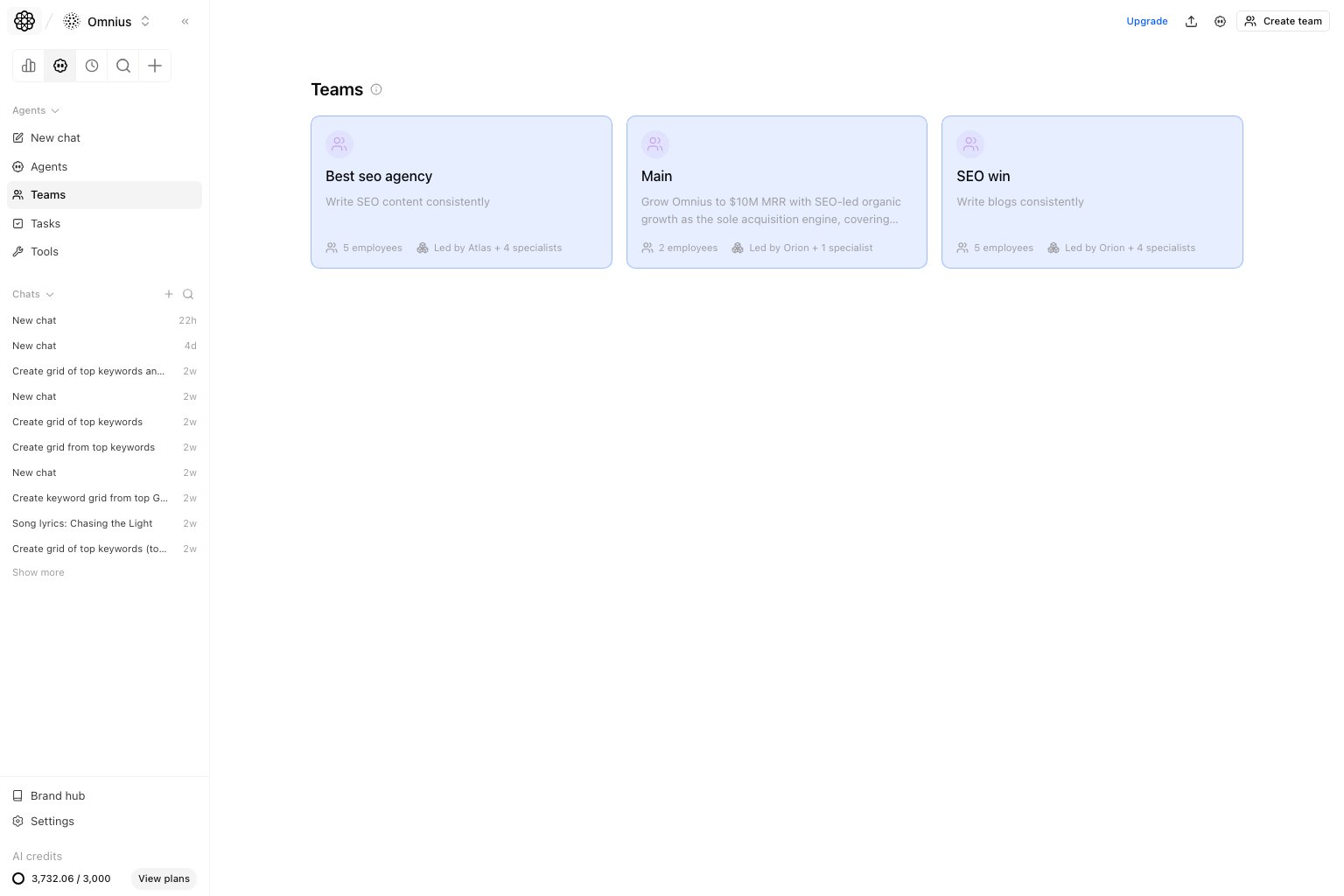 Use Teams when one agent is not enough. This page helps you define reusable multi-agent groups for recurring work that needs planning, execution, and review roles.
## Questions this page should answer
1. Which agents should work together as a team?
2. Which team already fits this workflow?
3. Which teams need role or member changes?
## Before you create a team
* Define the repeated workflow before choosing agents.
* Confirm one agent should coordinate the work.
* Decide what each specialist contributes and where handoff happens.
* Avoid creating a team when a single agent can produce the output reliably.
## What this page gives you
* A dedicated team library alongside the agent library.
* Team detail and edit flows.
* A stable way to reuse the same team structure across future tasks.
## How to read the team library
Read each team as a reusable operating pattern:
* `Team name`: the outcome or workflow the team supports.
* `Members`: the specialist agents involved.
* `Coordinator`: the agent responsible for planning and handoff.
* `Description`: the boundary of work the team should own.
Use this rule:
* Use a team when work needs planning, execution, and review roles.
* Use one agent when the task is narrow and does not need role separation.
* Use a workflow when the steps, inputs, and outputs need stronger structure.
## How to use this page
### Create teams around a workflow, not around departments
Good teams map to a real operating pattern such as research plus writing plus QA. They should exist because the same sequence repeats often enough to deserve reuse.
### Keep one orchestrator
The team should have one clear coordinator. Without that, the output quality becomes hard to predict and task handoffs become noisy.
### Review teams after repeated failures
If a workflow stalls or produces inconsistent results, review the team roles before adding more prompt instructions.
## Quick monthly checklist
1. Review teams that were used in the last month.
2. Remove teams that duplicate a simpler single-agent setup.
3. Check whether each team has one clear coordinator.
4. Update roles when workflows or strategy change.
5. Test important teams with a fresh chat before relying on them in a workflow.
## What to fix first
| Pattern in Teams | What it usually means | Recommended action |
| ---------------------------------- | ------------------------------------ | ------------------------------------------------ |
| Several agents do the same role | Team structure is redundant | Remove overlap or merge roles |
| No clear coordinator | Handoffs will be inconsistent | Assign one orchestrating agent |
| Team output is generic | Roles are too broad | Narrow each member’s purpose and expected output |
| Team only gets used once | It may not deserve a reusable team | Use New chat or a single agent instead |
| Repeated failures across workflows | Team roles do not match the workflow | Update team composition before changing prompts |
## Team routine
1. Before launch: test the team on one representative request.
2. After failures: review roles before adding more instructions.
3. Quarterly: prune unused or overlapping teams.
## Keep in mind
* Teams are for repeatability, not novelty.
* A strong team usually needs fewer prompt workarounds.
* If one agent can do the job well, keep the simpler setup.
## Where to go next
* [Agents](/automation/agents/overview)
* [Tasks](/automation/tasks/overview)
* [Workflows](/automation/workflows/overview)
* [New chat](/automation/new-chat/overview)
Use Teams when one agent is not enough. This page helps you define reusable multi-agent groups for recurring work that needs planning, execution, and review roles.
## Questions this page should answer
1. Which agents should work together as a team?
2. Which team already fits this workflow?
3. Which teams need role or member changes?
## Before you create a team
* Define the repeated workflow before choosing agents.
* Confirm one agent should coordinate the work.
* Decide what each specialist contributes and where handoff happens.
* Avoid creating a team when a single agent can produce the output reliably.
## What this page gives you
* A dedicated team library alongside the agent library.
* Team detail and edit flows.
* A stable way to reuse the same team structure across future tasks.
## How to read the team library
Read each team as a reusable operating pattern:
* `Team name`: the outcome or workflow the team supports.
* `Members`: the specialist agents involved.
* `Coordinator`: the agent responsible for planning and handoff.
* `Description`: the boundary of work the team should own.
Use this rule:
* Use a team when work needs planning, execution, and review roles.
* Use one agent when the task is narrow and does not need role separation.
* Use a workflow when the steps, inputs, and outputs need stronger structure.
## How to use this page
### Create teams around a workflow, not around departments
Good teams map to a real operating pattern such as research plus writing plus QA. They should exist because the same sequence repeats often enough to deserve reuse.
### Keep one orchestrator
The team should have one clear coordinator. Without that, the output quality becomes hard to predict and task handoffs become noisy.
### Review teams after repeated failures
If a workflow stalls or produces inconsistent results, review the team roles before adding more prompt instructions.
## Quick monthly checklist
1. Review teams that were used in the last month.
2. Remove teams that duplicate a simpler single-agent setup.
3. Check whether each team has one clear coordinator.
4. Update roles when workflows or strategy change.
5. Test important teams with a fresh chat before relying on them in a workflow.
## What to fix first
| Pattern in Teams | What it usually means | Recommended action |
| ---------------------------------- | ------------------------------------ | ------------------------------------------------ |
| Several agents do the same role | Team structure is redundant | Remove overlap or merge roles |
| No clear coordinator | Handoffs will be inconsistent | Assign one orchestrating agent |
| Team output is generic | Roles are too broad | Narrow each member’s purpose and expected output |
| Team only gets used once | It may not deserve a reusable team | Use New chat or a single agent instead |
| Repeated failures across workflows | Team roles do not match the workflow | Update team composition before changing prompts |
## Team routine
1. Before launch: test the team on one representative request.
2. After failures: review roles before adding more instructions.
3. Quarterly: prune unused or overlapping teams.
## Keep in mind
* Teams are for repeatability, not novelty.
* A strong team usually needs fewer prompt workarounds.
* If one agent can do the job well, keep the simpler setup.
## Where to go next
* [Agents](/automation/agents/overview)
* [Tasks](/automation/tasks/overview)
* [Workflows](/automation/workflows/overview)
* [New chat](/automation/new-chat/overview)