> ## Documentation Index
> Fetch the complete documentation index at: https://docs.atomicagi.com/llms.txt
> Use this file to discover all available pages before exploring further.
# Tools
> Inspect tool inputs, run tools directly, and understand which tool categories are available for the current project
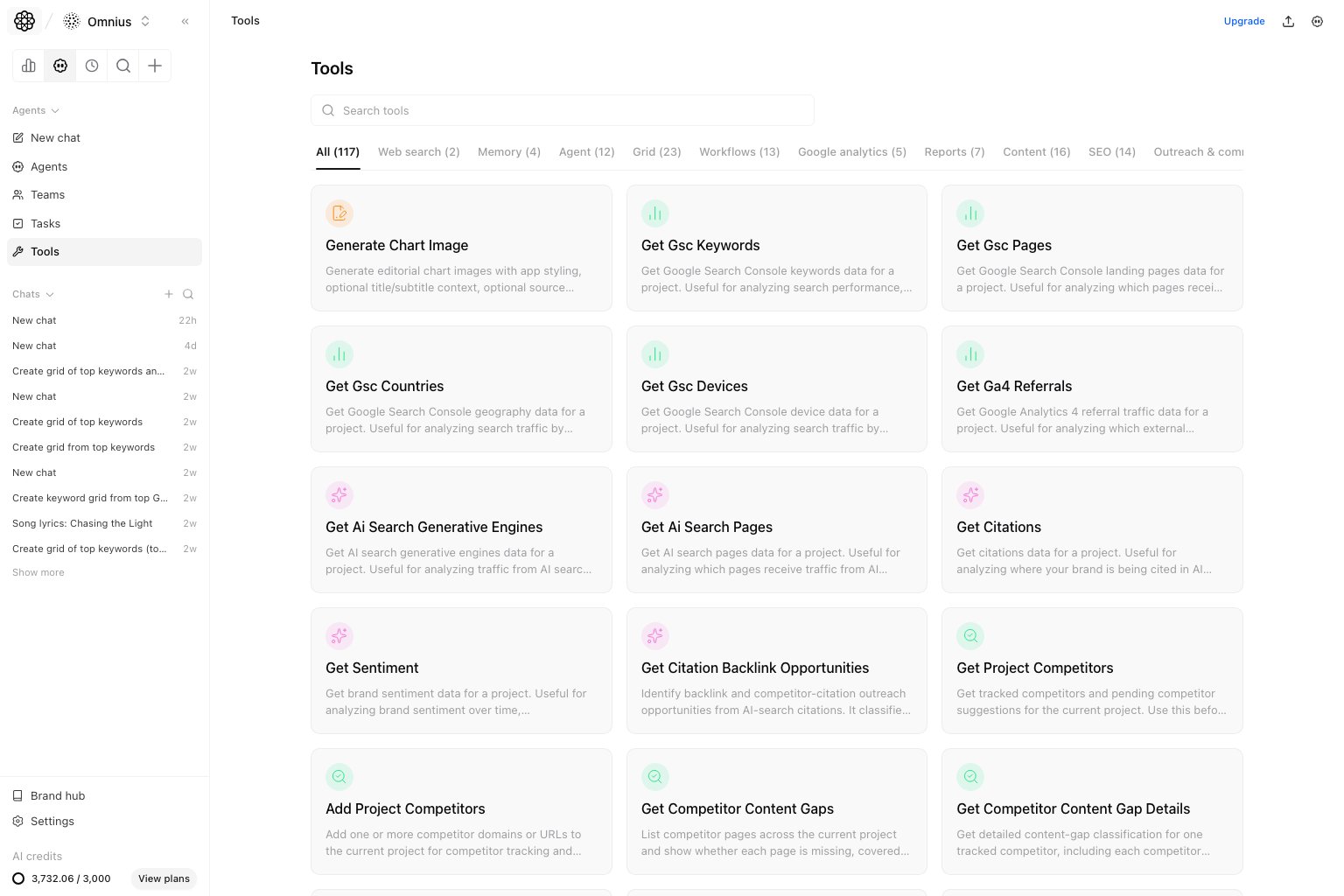 Use Tools when you need to inspect or run an available tool directly. This page is the lowest-level view of the project tool surface.
## Questions this page should answer
1. Which tools are available in this project?
2. What inputs does a tool require?
3. What result shape should I expect before I wire the tool into an agent or workflow?
## Before you run tools directly
* Know the project and data source the tool should use.
* Confirm you have permission to run the tool.
* Start with the smallest valid input.
* Use direct runs for verification, not as a replacement for repeatable workflows.
## What this page gives you
* A categorized tool library.
* Tool descriptions and input schemas.
* Direct execution with form-based arguments.
* Raw results you can inspect or copy.
## How to read tool details
Read the tool panel before running anything:
* `Description`: what the tool is meant to do.
* `Input schema`: required fields, optional fields, and accepted value types.
* `Category`: where the tool fits in the project capability surface.
* `Result`: the raw shape an agent or workflow will receive.
Use this rule:
* If the tool succeeds here but an agent fails, the issue is likely prompt/context.
* If the tool fails here, fix credentials, permissions, or input shape first.
* If the output shape is too raw for a user, wrap it in an agent or workflow.
## How to use this page
### Start with the category
Use the category grouping to narrow the surface before you inspect individual tools. This is faster than searching every tool name when you only need one domain such as SEO, reports, or AI search.
### Read the required fields carefully
The input schema tells you which arguments are mandatory and what type each argument expects. Validate that first before assuming a tool is broken.
### Use direct runs for verification
Run the tool here when you need to confirm output shape, test a narrow input, or debug why an agent is producing weak results.
## Quick debugging checklist
1. Confirm the tool exists in the expected category.
2. Check required input fields before running.
3. Run with one narrow input.
4. Inspect the raw result shape.
5. Compare direct output with what the agent or workflow produced.
## What to fix first
| Pattern in Tools | What it usually means | Recommended action |
| -------------------------------- | ---------------------------------------- | --------------------------------------------- |
| Tool is missing | Feature, permission, or setup is absent | Check project settings and member permissions |
| Required input is unclear | Workflow or prompt needs a clearer value | Define the exact input before running |
| Direct run fails | Tool setup or data access is broken | Fix credentials, integration, or data source |
| Direct run succeeds, agent fails | Agent context is weak | Improve the agent prompt or tool instructions |
| Output is correct but noisy | Result needs interpretation | Use an agent/workflow step to summarize it |
## Team routine
1. Use Tools to verify new capabilities before adding them to agents.
2. Save known-good inputs for recurring workflows.
3. Re-test tools after integration or permission changes.
## Keep in mind
* This page is for verification and targeted runs, not for broad workflow orchestration.
* Tool availability depends on project capabilities and permissions.
* If a tool run is noisy, fix the input shape before changing the agent.
## Where to go next
* [Agents](/automation/agents/overview)
* [Workflows](/automation/workflows/overview)
* [Tasks](/automation/tasks/overview)
* [Automations](/automation/automations/overview)
Use Tools when you need to inspect or run an available tool directly. This page is the lowest-level view of the project tool surface.
## Questions this page should answer
1. Which tools are available in this project?
2. What inputs does a tool require?
3. What result shape should I expect before I wire the tool into an agent or workflow?
## Before you run tools directly
* Know the project and data source the tool should use.
* Confirm you have permission to run the tool.
* Start with the smallest valid input.
* Use direct runs for verification, not as a replacement for repeatable workflows.
## What this page gives you
* A categorized tool library.
* Tool descriptions and input schemas.
* Direct execution with form-based arguments.
* Raw results you can inspect or copy.
## How to read tool details
Read the tool panel before running anything:
* `Description`: what the tool is meant to do.
* `Input schema`: required fields, optional fields, and accepted value types.
* `Category`: where the tool fits in the project capability surface.
* `Result`: the raw shape an agent or workflow will receive.
Use this rule:
* If the tool succeeds here but an agent fails, the issue is likely prompt/context.
* If the tool fails here, fix credentials, permissions, or input shape first.
* If the output shape is too raw for a user, wrap it in an agent or workflow.
## How to use this page
### Start with the category
Use the category grouping to narrow the surface before you inspect individual tools. This is faster than searching every tool name when you only need one domain such as SEO, reports, or AI search.
### Read the required fields carefully
The input schema tells you which arguments are mandatory and what type each argument expects. Validate that first before assuming a tool is broken.
### Use direct runs for verification
Run the tool here when you need to confirm output shape, test a narrow input, or debug why an agent is producing weak results.
## Quick debugging checklist
1. Confirm the tool exists in the expected category.
2. Check required input fields before running.
3. Run with one narrow input.
4. Inspect the raw result shape.
5. Compare direct output with what the agent or workflow produced.
## What to fix first
| Pattern in Tools | What it usually means | Recommended action |
| -------------------------------- | ---------------------------------------- | --------------------------------------------- |
| Tool is missing | Feature, permission, or setup is absent | Check project settings and member permissions |
| Required input is unclear | Workflow or prompt needs a clearer value | Define the exact input before running |
| Direct run fails | Tool setup or data access is broken | Fix credentials, integration, or data source |
| Direct run succeeds, agent fails | Agent context is weak | Improve the agent prompt or tool instructions |
| Output is correct but noisy | Result needs interpretation | Use an agent/workflow step to summarize it |
## Team routine
1. Use Tools to verify new capabilities before adding them to agents.
2. Save known-good inputs for recurring workflows.
3. Re-test tools after integration or permission changes.
## Keep in mind
* This page is for verification and targeted runs, not for broad workflow orchestration.
* Tool availability depends on project capabilities and permissions.
* If a tool run is noisy, fix the input shape before changing the agent.
## Where to go next
* [Agents](/automation/agents/overview)
* [Workflows](/automation/workflows/overview)
* [Tasks](/automation/tasks/overview)
* [Automations](/automation/automations/overview)