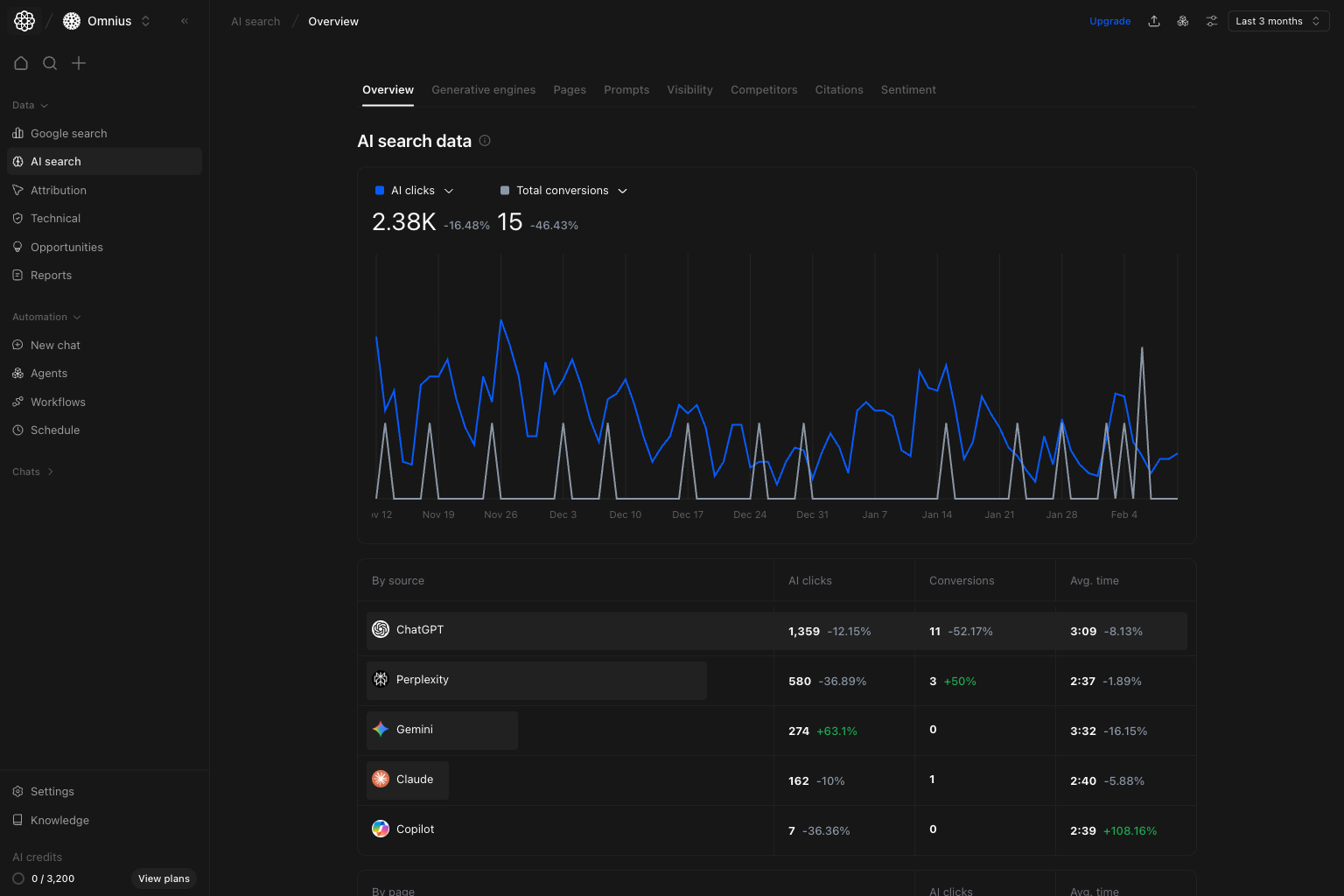
 Use this page as your weekly control center for AI Search. It tells you where performance is moving before you jump into deeper pages.
Important: Review this page first, then drill down. It prevents teams from optimizing the wrong source or page.
Key signal: If clicks and conversions both decline, start with visibility and prompt coverage checks before page-level edits.
Example: If ChatGPT clicks drop 22% and conversions drop 18% in the same week, first review Visibility and Prompts for that source before changing landing pages.
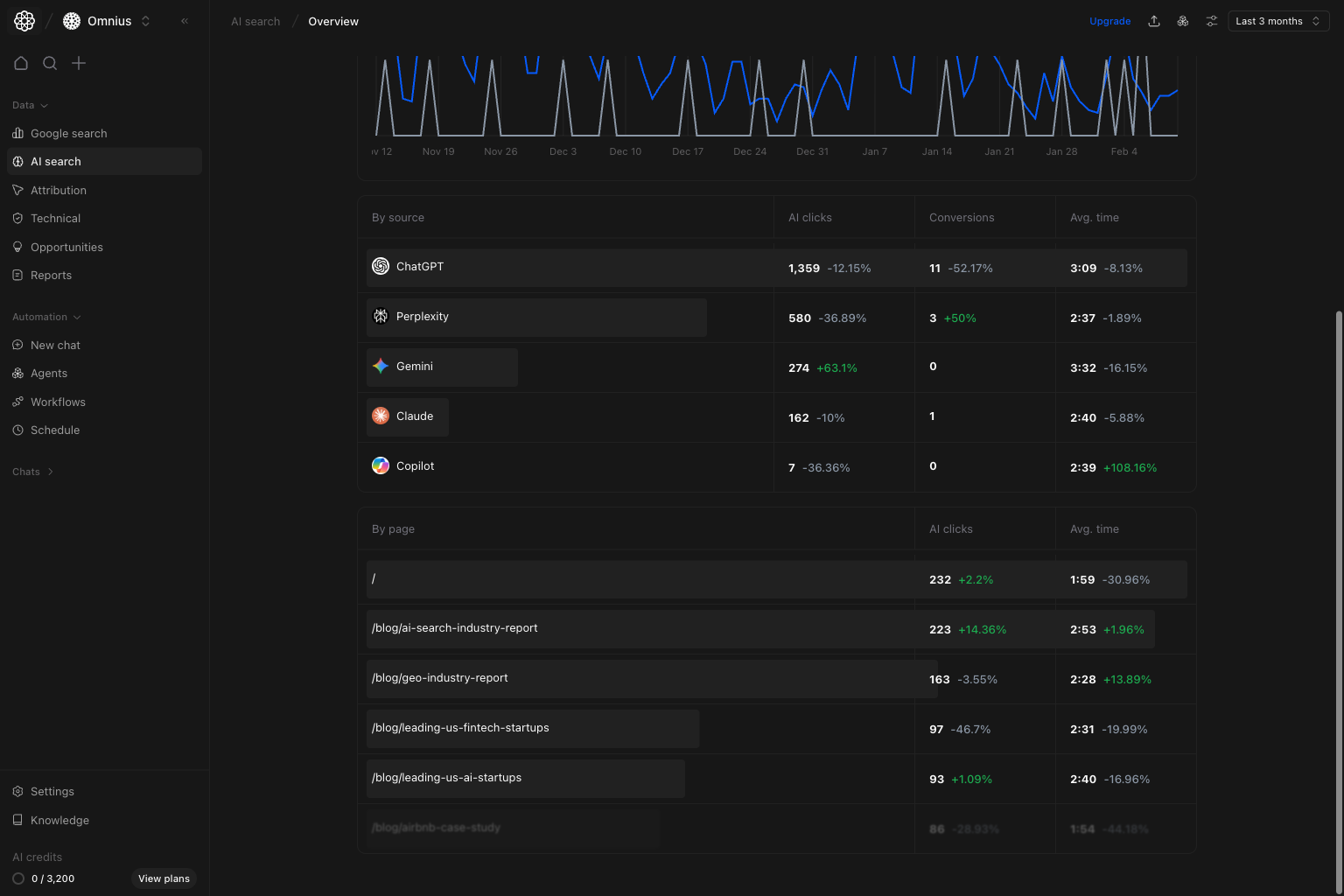 Use `By source` to decide engine focus for the week:
* Prioritize sources with strong conversion efficiency.
* Flag sources with sharp drop in clicks and conversions.
* Avoid over-investing in sources that drive volume but no business impact.
## By page section
In the same table view, use `By page` to choose URL-level actions:
* Pages with high AI clicks and weak avg. time need better on-page clarity.
* Pages with stable traffic but falling outcomes need message refinement.
* Pages with improving outcomes are templates for replication.
## Quick weekly checklist
1. Confirm top-line direction from clicks and conversions.
2. Pick one growth source and one declining source.
3. Pick three URLs for immediate improvement.
4. Route deeper analysis to the right page: Visibility, Prompts, Pages, or Citations.
## How to use filters
* Use date range first to keep reporting consistent.
* Narrow by one segment at a time when validating a hypothesis.
* Do not compare mixed filter sets in the same decision.
## What to fix first
| Pattern in Overview data | What it usually means | Recommended action |
| -------------------------------- | ------------------------------------------- | ------------------------------------------------ |
| Clicks down and conversions down | Visibility or prompt relevance loss | Check `Visibility` and `Prompts` first |
| Clicks up, conversions flat | Traffic quality mismatch | Improve destination pages and intent alignment |
| One source drops sharply | Platform-specific issue | Investigate `Generative engines` and competitors |
| Stable traffic, weaker avg. time | Content experience mismatch after the click | Improve page structure and value clarity |
## Team routine
1. Weekly: run Overview first before any deep dive.
2. Bi-weekly: compare source efficiency changes.
3. Monthly: report AI Search contribution to business outcomes.
## Keep in mind
* AI traffic can be volatile in short windows.
* Conversion lag can hide recent improvements.
* Top-line trend is useful only when paired with source and page context.
## Where to go next
* [Generative engines](/data/ai-search/generative-engines)
* [Visibility](/data/ai-search/visibility)
* [Pages](/data/ai-search/pages)
* [Prompts](/data/ai-search/prompts)
* [Citations](/data/ai-search/citations)
* [Sentiment](/data/ai-search/sentiment)
Use `By source` to decide engine focus for the week:
* Prioritize sources with strong conversion efficiency.
* Flag sources with sharp drop in clicks and conversions.
* Avoid over-investing in sources that drive volume but no business impact.
## By page section
In the same table view, use `By page` to choose URL-level actions:
* Pages with high AI clicks and weak avg. time need better on-page clarity.
* Pages with stable traffic but falling outcomes need message refinement.
* Pages with improving outcomes are templates for replication.
## Quick weekly checklist
1. Confirm top-line direction from clicks and conversions.
2. Pick one growth source and one declining source.
3. Pick three URLs for immediate improvement.
4. Route deeper analysis to the right page: Visibility, Prompts, Pages, or Citations.
## How to use filters
* Use date range first to keep reporting consistent.
* Narrow by one segment at a time when validating a hypothesis.
* Do not compare mixed filter sets in the same decision.
## What to fix first
| Pattern in Overview data | What it usually means | Recommended action |
| -------------------------------- | ------------------------------------------- | ------------------------------------------------ |
| Clicks down and conversions down | Visibility or prompt relevance loss | Check `Visibility` and `Prompts` first |
| Clicks up, conversions flat | Traffic quality mismatch | Improve destination pages and intent alignment |
| One source drops sharply | Platform-specific issue | Investigate `Generative engines` and competitors |
| Stable traffic, weaker avg. time | Content experience mismatch after the click | Improve page structure and value clarity |
## Team routine
1. Weekly: run Overview first before any deep dive.
2. Bi-weekly: compare source efficiency changes.
3. Monthly: report AI Search contribution to business outcomes.
## Keep in mind
* AI traffic can be volatile in short windows.
* Conversion lag can hide recent improvements.
* Top-line trend is useful only when paired with source and page context.
## Where to go next
* [Generative engines](/data/ai-search/generative-engines)
* [Visibility](/data/ai-search/visibility)
* [Pages](/data/ai-search/pages)
* [Prompts](/data/ai-search/prompts)
* [Citations](/data/ai-search/citations)
* [Sentiment](/data/ai-search/sentiment)