> ## Documentation Index
> Fetch the complete documentation index at: https://docs.atomicagi.com/llms.txt
> Use this file to discover all available pages before exploring further.
# Competitors
> Track accepted competitors, crawl status, and suggested additions so your competitive coverage stays current
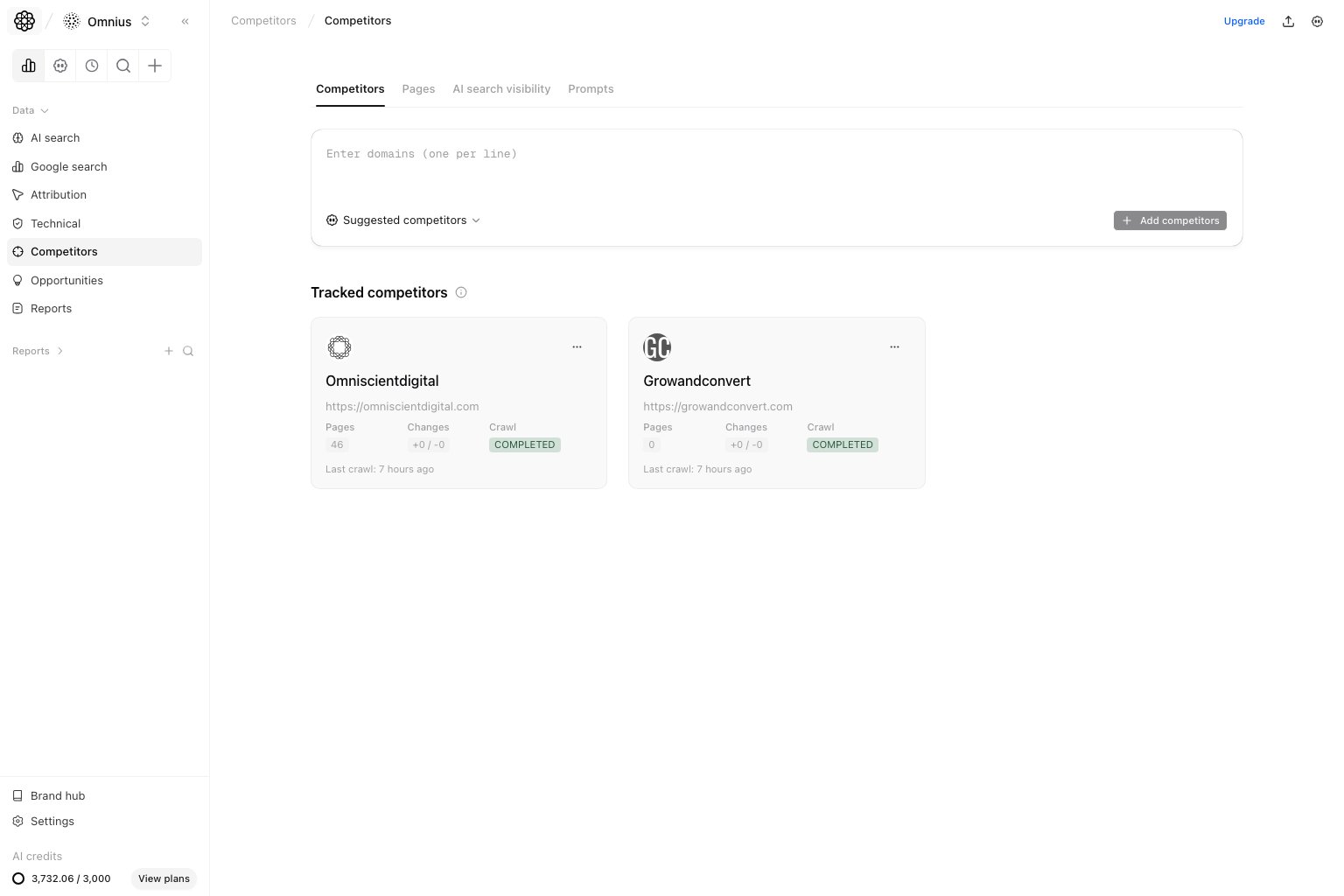 Use this page to maintain the competitor set behind the rest of the competitor views. This is where you decide which domains belong in your ongoing competitive analysis.
## Questions this page should answer
1. Which competitor domains are currently tracked?
2. Which suggested competitors should we accept or dismiss?
3. Which competitor crawls are ready, pending, or failed?
## Before you manage competitors
* Keep the list focused on direct search competitors, not every adjacent brand.
* Add domains in batches when you are expanding into a new segment.
* Review crawl status before expecting data on the other competitor pages.
## What this page gives you
* The accepted competitor list for the project.
* Suggested competitors you can accept or dismiss.
* Crawl status and crawl recency for each competitor.
* A form to add domains manually.
## How to read the competitor list
Read this page as the source of truth for every downstream competitor report.
* `Domain`: the competitor Atomic will compare against your project.
* `Status`: whether the competitor crawl is ready, pending, or failed.
* `Last crawled`: how fresh the competitor page data is.
* `Suggested competitors`: candidate domains that still need review.
Use this rule:
* If a competitor is not accepted here, do not expect it in competitor page or prompt analysis.
* If a competitor crawl is pending, wait before diagnosing missing downstream data.
* If a competitor is no longer strategically relevant, remove it before it pollutes comparisons.
## How these statuses work (simple)
```text theme={null}
Accepted competitor = domain selected for ongoing project comparison
```
```text theme={null}
Crawl status = latest collection state for that competitor domain
```
Suggested competitors are discovery candidates. They become part of analysis only after someone accepts them.
## How to use this page
### Keep the list narrow and intentional
Too many competitors create noisy page and prompt comparisons. Track the domains that compete for the same audience, SERP space, or AI answer share.
### Review suggestions before accepting
Suggested competitors save time, but they still need human judgment. Accept the domains that truly overlap with your offer and dismiss the rest.
### Watch crawl status
Pending or failed crawls explain missing downstream competitor data. Fix the tracked list first before assuming the analysis pages are wrong.
## Quick weekly checklist
1. Review new suggested competitors.
2. Accept only domains that compete for the same audience, SERP, or AI-answer space.
3. Remove stale competitors that no longer match the strategy.
4. Check crawl status before opening page-level or prompt-level competitor reports.
5. Re-run downstream analysis after large competitor list changes.
## How to use filters
* Filter by status when you need to find pending or failed crawls quickly.
* Search by domain when the competitor list is large.
* Review suggestions in batches so the accepted list stays intentional.
## What to fix first
| Pattern on Competitors page | What it usually means | Recommended action |
| ---------------------------------- | ------------------------------------- | ------------------------------------------------------ |
| Many suggestions are unreviewed | Competitor set is drifting | Accept or dismiss suggestions before deeper analysis |
| Important competitor is missing | Downstream reports will under-compare | Add the domain manually and wait for crawl completion |
| Crawl status is failed or stale | Page/prompt data may be incomplete | Re-check domain validity and retry crawl if available |
| Too many accepted competitors | Analysis will become noisy | Keep only direct strategic or search competitors |
| Competitors are from mixed markets | Benchmarks will be misleading | Split analysis by market or keep only relevant domains |
## Team routine
1. Weekly: review suggestions and crawl status.
2. Bi-weekly: prune accepted competitors that no longer matter.
3. Monthly: align the competitor set with campaign, market, and AI-search priorities.
## Keep in mind
* This page controls the competitor set used by the other competitor views.
* New competitors may need time before page-level analysis becomes useful.
* A clean competitor list improves both prompt and content-gap decisions.
## Where to go next
* [Competitor pages](/data/competitors/pages)
* [Competitor AI search visibility](/data/competitors/ai-search-visibility)
* [Competitor prompts](/data/competitors/prompts)
* [AI Search competitors](/data/ai-search/competitors)
Use this page to maintain the competitor set behind the rest of the competitor views. This is where you decide which domains belong in your ongoing competitive analysis.
## Questions this page should answer
1. Which competitor domains are currently tracked?
2. Which suggested competitors should we accept or dismiss?
3. Which competitor crawls are ready, pending, or failed?
## Before you manage competitors
* Keep the list focused on direct search competitors, not every adjacent brand.
* Add domains in batches when you are expanding into a new segment.
* Review crawl status before expecting data on the other competitor pages.
## What this page gives you
* The accepted competitor list for the project.
* Suggested competitors you can accept or dismiss.
* Crawl status and crawl recency for each competitor.
* A form to add domains manually.
## How to read the competitor list
Read this page as the source of truth for every downstream competitor report.
* `Domain`: the competitor Atomic will compare against your project.
* `Status`: whether the competitor crawl is ready, pending, or failed.
* `Last crawled`: how fresh the competitor page data is.
* `Suggested competitors`: candidate domains that still need review.
Use this rule:
* If a competitor is not accepted here, do not expect it in competitor page or prompt analysis.
* If a competitor crawl is pending, wait before diagnosing missing downstream data.
* If a competitor is no longer strategically relevant, remove it before it pollutes comparisons.
## How these statuses work (simple)
```text theme={null}
Accepted competitor = domain selected for ongoing project comparison
```
```text theme={null}
Crawl status = latest collection state for that competitor domain
```
Suggested competitors are discovery candidates. They become part of analysis only after someone accepts them.
## How to use this page
### Keep the list narrow and intentional
Too many competitors create noisy page and prompt comparisons. Track the domains that compete for the same audience, SERP space, or AI answer share.
### Review suggestions before accepting
Suggested competitors save time, but they still need human judgment. Accept the domains that truly overlap with your offer and dismiss the rest.
### Watch crawl status
Pending or failed crawls explain missing downstream competitor data. Fix the tracked list first before assuming the analysis pages are wrong.
## Quick weekly checklist
1. Review new suggested competitors.
2. Accept only domains that compete for the same audience, SERP, or AI-answer space.
3. Remove stale competitors that no longer match the strategy.
4. Check crawl status before opening page-level or prompt-level competitor reports.
5. Re-run downstream analysis after large competitor list changes.
## How to use filters
* Filter by status when you need to find pending or failed crawls quickly.
* Search by domain when the competitor list is large.
* Review suggestions in batches so the accepted list stays intentional.
## What to fix first
| Pattern on Competitors page | What it usually means | Recommended action |
| ---------------------------------- | ------------------------------------- | ------------------------------------------------------ |
| Many suggestions are unreviewed | Competitor set is drifting | Accept or dismiss suggestions before deeper analysis |
| Important competitor is missing | Downstream reports will under-compare | Add the domain manually and wait for crawl completion |
| Crawl status is failed or stale | Page/prompt data may be incomplete | Re-check domain validity and retry crawl if available |
| Too many accepted competitors | Analysis will become noisy | Keep only direct strategic or search competitors |
| Competitors are from mixed markets | Benchmarks will be misleading | Split analysis by market or keep only relevant domains |
## Team routine
1. Weekly: review suggestions and crawl status.
2. Bi-weekly: prune accepted competitors that no longer matter.
3. Monthly: align the competitor set with campaign, market, and AI-search priorities.
## Keep in mind
* This page controls the competitor set used by the other competitor views.
* New competitors may need time before page-level analysis becomes useful.
* A clean competitor list improves both prompt and content-gap decisions.
## Where to go next
* [Competitor pages](/data/competitors/pages)
* [Competitor AI search visibility](/data/competitors/ai-search-visibility)
* [Competitor prompts](/data/competitors/prompts)
* [AI Search competitors](/data/ai-search/competitors)