> ## Documentation Index
> Fetch the complete documentation index at: https://docs.atomicagi.com/llms.txt
> Use this file to discover all available pages before exploring further.
# LLM audit
> Run a full AI-readiness audit and turn findings into a clear technical backlog
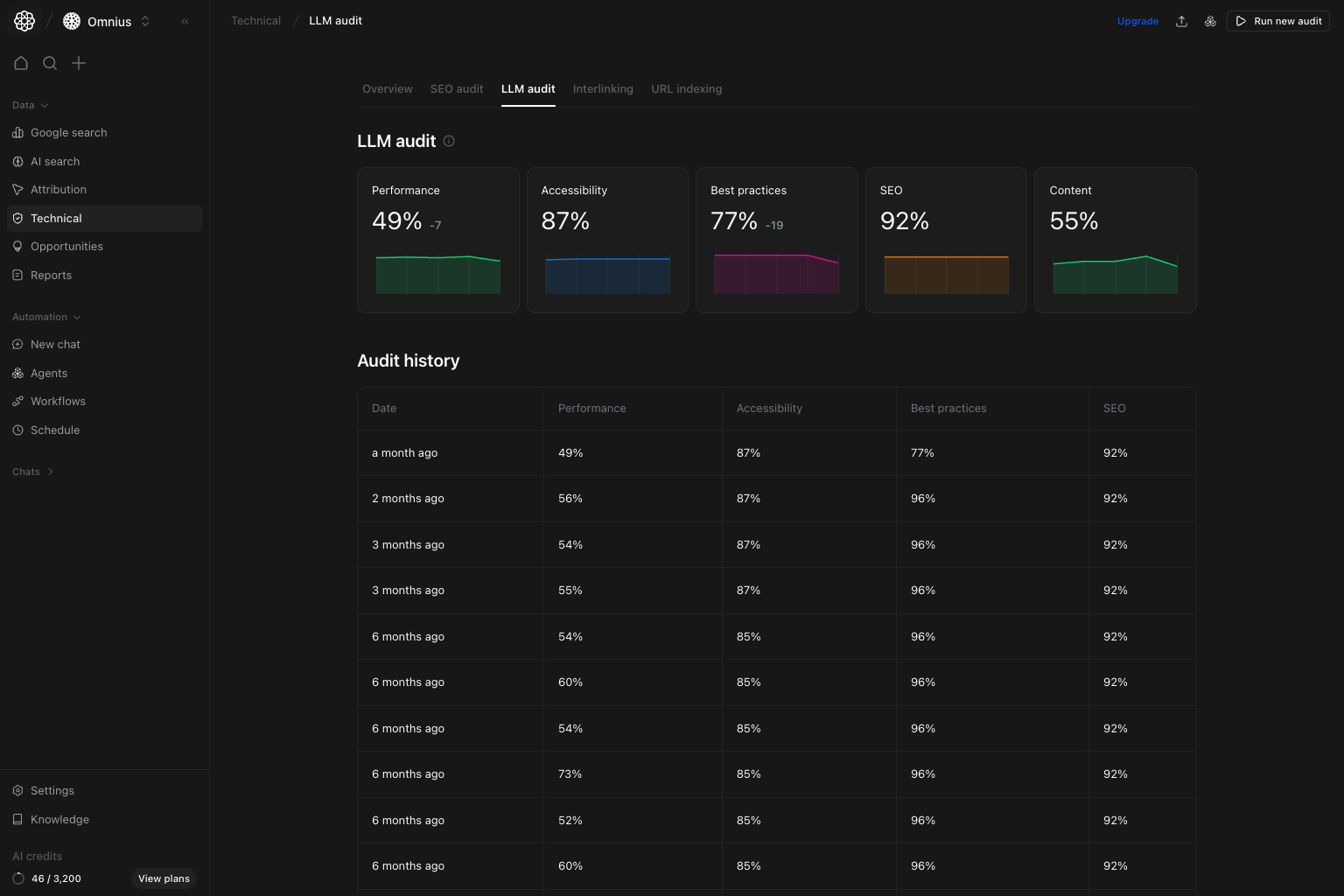 Use LLM audit to check if your site is ready for AI discovery, then turn the findings into concrete fixes for engineering and SEO.
## Questions this page should answer
1. Is AI-readiness improving or stalling over time?
2. Which technical area is holding us back right now?
3. What should we fix first this sprint?
## Before you analyze
* Keep the same date range you use in AI Search pages.
* Compare the newest run with at least one prior run.
* Open the newest run detail before creating tickets.
## What this page gives you
* Five top scores: `Performance`, `Accessibility`, `Best practices`, `SEO`, `Content`
* `Audit history` so you can compare runs over time
* A full report preview with crawlability, schema, content structure, NLP, and Lighthouse-based diagnostics
## How to read the list view
* `Performance`: speed and technical execution quality
* `Accessibility`: structural clarity for users and machines
* `Best practices`: implementation hygiene and safety checks
* `SEO`: search-engine technical health
* `Content`: clarity and structure of on-page content for model understanding
How to interpret the top row:
* Low `Content` with high `SEO` usually means classic SEO is fine, but model parsing quality is weak.
* Low `Performance` can reduce crawl reliability and increase processing friction.
* Flat scores for months usually mean no active technical improvement cycle.
## How these scores are calculated (simple)
### Category score (`Performance`, `Accessibility`, `Best practices`, `SEO`, `Content`)
Category scores are weighted pass rates of checks in that category, shown on a `0-100` scale.
Higher score means fewer critical and major failures in that category.
## How to use audit history
Use `Audit history` as your change log:
1. Open the latest completed row.
2. Compare against the previous row.
3. Validate which fixes moved scores and which had no effect.
## LLM audit result preview: read it in this order
Start from the top and move block-by-block. This keeps the analysis focused and prevents random fixing.
## 1) LLM performance and crawlability
Use LLM audit to check if your site is ready for AI discovery, then turn the findings into concrete fixes for engineering and SEO.
## Questions this page should answer
1. Is AI-readiness improving or stalling over time?
2. Which technical area is holding us back right now?
3. What should we fix first this sprint?
## Before you analyze
* Keep the same date range you use in AI Search pages.
* Compare the newest run with at least one prior run.
* Open the newest run detail before creating tickets.
## What this page gives you
* Five top scores: `Performance`, `Accessibility`, `Best practices`, `SEO`, `Content`
* `Audit history` so you can compare runs over time
* A full report preview with crawlability, schema, content structure, NLP, and Lighthouse-based diagnostics
## How to read the list view
* `Performance`: speed and technical execution quality
* `Accessibility`: structural clarity for users and machines
* `Best practices`: implementation hygiene and safety checks
* `SEO`: search-engine technical health
* `Content`: clarity and structure of on-page content for model understanding
How to interpret the top row:
* Low `Content` with high `SEO` usually means classic SEO is fine, but model parsing quality is weak.
* Low `Performance` can reduce crawl reliability and increase processing friction.
* Flat scores for months usually mean no active technical improvement cycle.
## How these scores are calculated (simple)
### Category score (`Performance`, `Accessibility`, `Best practices`, `SEO`, `Content`)
Category scores are weighted pass rates of checks in that category, shown on a `0-100` scale.
Higher score means fewer critical and major failures in that category.
## How to use audit history
Use `Audit history` as your change log:
1. Open the latest completed row.
2. Compare against the previous row.
3. Validate which fixes moved scores and which had no effect.
## LLM audit result preview: read it in this order
Start from the top and move block-by-block. This keeps the analysis focused and prevents random fixing.
## 1) LLM performance and crawlability
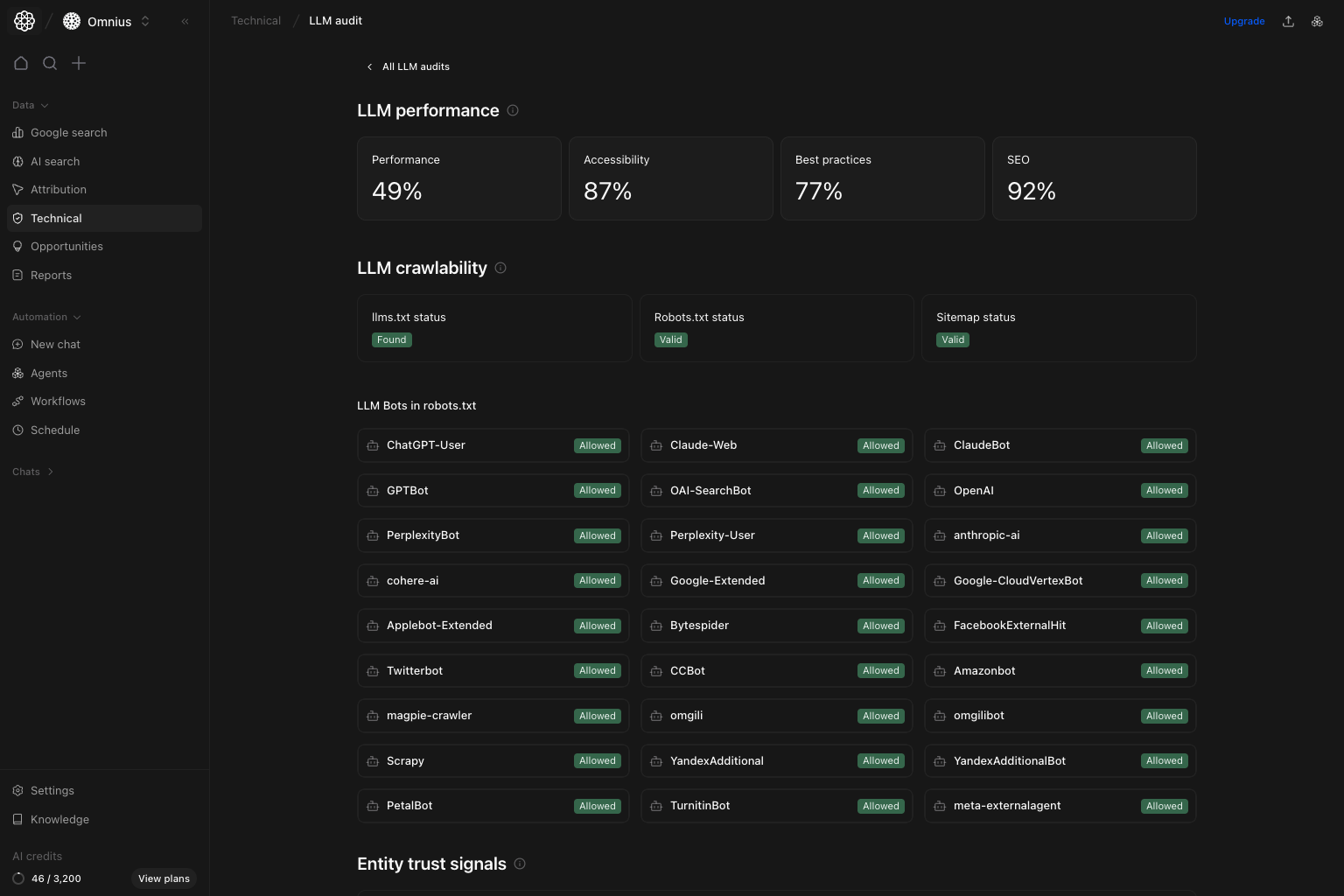 This top block tells you if AI systems can access and process your site reliably.
What to read first:
* `LLM performance` cards:
* `Performance`
* `Accessibility`
* `Best practices`
* `SEO`
* `LLM crawlability` status checks:
* `llms.txt status`
* `robots.txt status`
* `Sitemap status`
* `LLM Bots in robots.txt` allow/deny table.
What to do:
* If `robots.txt` or `sitemap` is not valid, fix that first.
* If important bots are blocked, adjust rules before content improvements.
* If score cards are weak and crawlability is healthy, move to deeper content and diagnostics sections.
## 2) Entity trust signals and schema validation
This top block tells you if AI systems can access and process your site reliably.
What to read first:
* `LLM performance` cards:
* `Performance`
* `Accessibility`
* `Best practices`
* `SEO`
* `LLM crawlability` status checks:
* `llms.txt status`
* `robots.txt status`
* `Sitemap status`
* `LLM Bots in robots.txt` allow/deny table.
What to do:
* If `robots.txt` or `sitemap` is not valid, fix that first.
* If important bots are blocked, adjust rules before content improvements.
* If score cards are weak and crawlability is healthy, move to deeper content and diagnostics sections.
## 2) Entity trust signals and schema validation
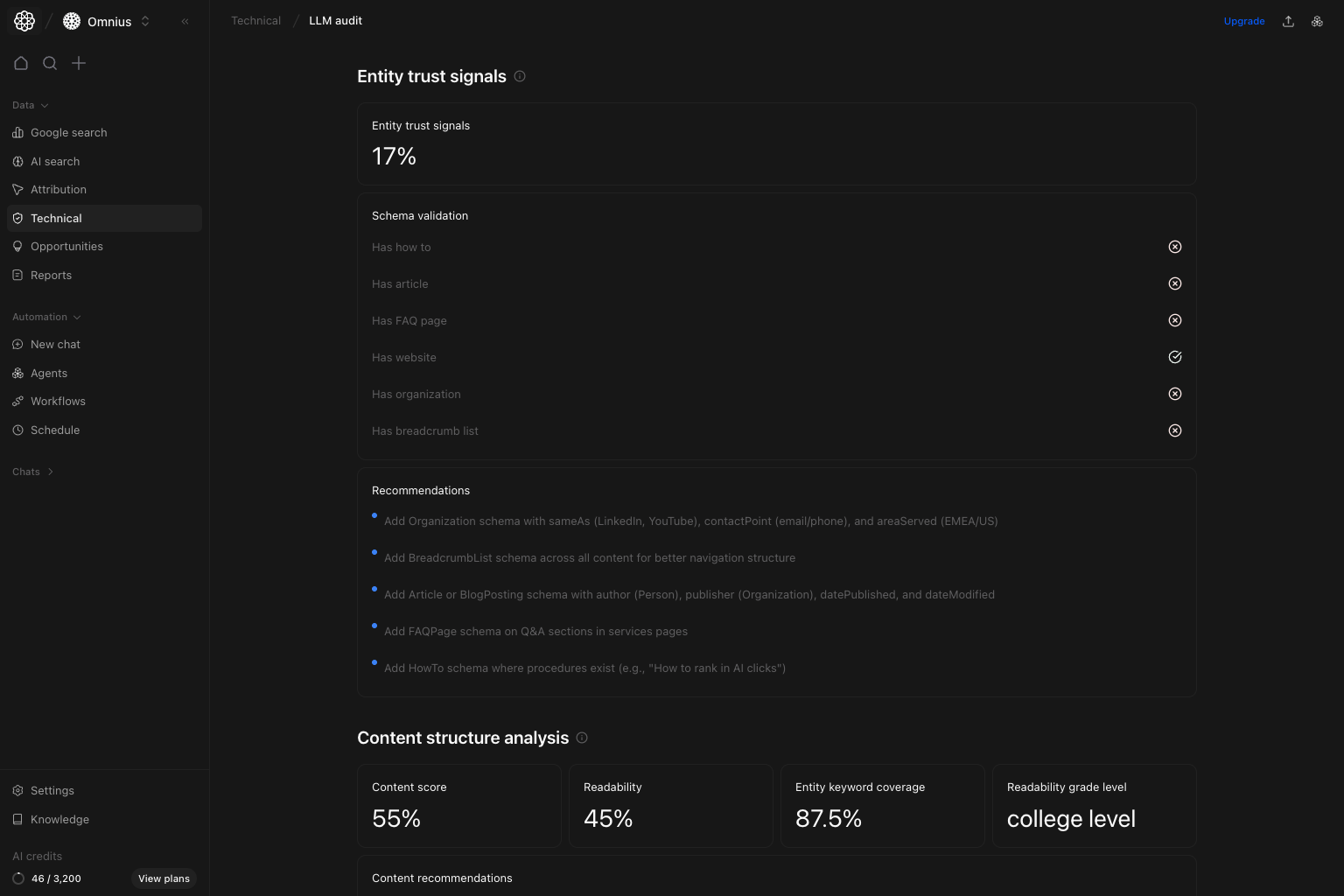 This section evaluates whether your site presents strong, machine-readable trust signals.
What’s included:
* `Entity trust signals` score.
* `Schema validation` checks, including:
* `HowTo`
* `Article`
* `FAQPage`
* `Organization`
* `BreadcrumbList`
* A recommendation list for missing or weak schema areas.
What to do:
* Add missing high-impact schema first (`Organization`, `Article`, `BreadcrumbList`, `FAQPage` where relevant).
* Keep schema aligned with actual page content.
* Use recommendation bullets as implementation tickets for dev/content teams.
## 3) Content structure and semantic coverage
This section evaluates whether your site presents strong, machine-readable trust signals.
What’s included:
* `Entity trust signals` score.
* `Schema validation` checks, including:
* `HowTo`
* `Article`
* `FAQPage`
* `Organization`
* `BreadcrumbList`
* A recommendation list for missing or weak schema areas.
What to do:
* Add missing high-impact schema first (`Organization`, `Article`, `BreadcrumbList`, `FAQPage` where relevant).
* Keep schema aligned with actual page content.
* Use recommendation bullets as implementation tickets for dev/content teams.
## 3) Content structure and semantic coverage
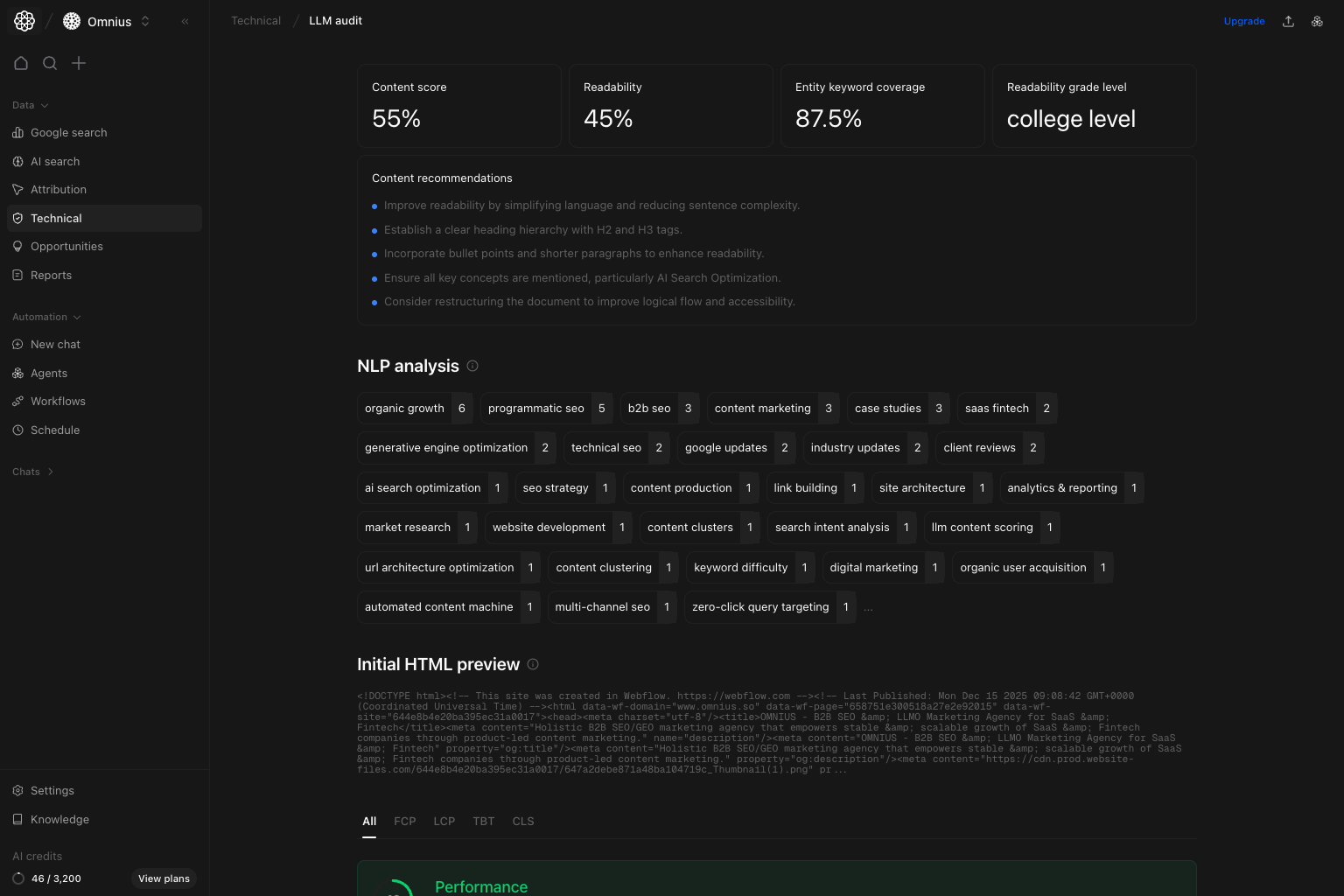 This section explains whether your content is easy for models to understand.
What’s included:
* `Content score`
* `Readability`
* `Entity keyword coverage`
* `Readability grade level`
* `Content recommendations`
* `NLP analysis` terms and topic distribution
* Start of `Initial HTML preview`
How to interpret:
* Low readability with good keyword coverage means your content has topics, but clarity is weak.
* Weak entity coverage means key topics/entities are not explicit enough.
* NLP clusters show what your page is actually about from a machine perspective.
What to do:
* Simplify language in key sections.
* Improve heading hierarchy (`H2`/`H3`) and paragraph structure.
* Ensure important entities and terms appear naturally in primary sections.
## 4) HTML preview, performance tabs, and diagnostics
This section explains whether your content is easy for models to understand.
What’s included:
* `Content score`
* `Readability`
* `Entity keyword coverage`
* `Readability grade level`
* `Content recommendations`
* `NLP analysis` terms and topic distribution
* Start of `Initial HTML preview`
How to interpret:
* Low readability with good keyword coverage means your content has topics, but clarity is weak.
* Weak entity coverage means key topics/entities are not explicit enough.
* NLP clusters show what your page is actually about from a machine perspective.
What to do:
* Simplify language in key sections.
* Improve heading hierarchy (`H2`/`H3`) and paragraph structure.
* Ensure important entities and terms appear naturally in primary sections.
## 4) HTML preview, performance tabs, and diagnostics
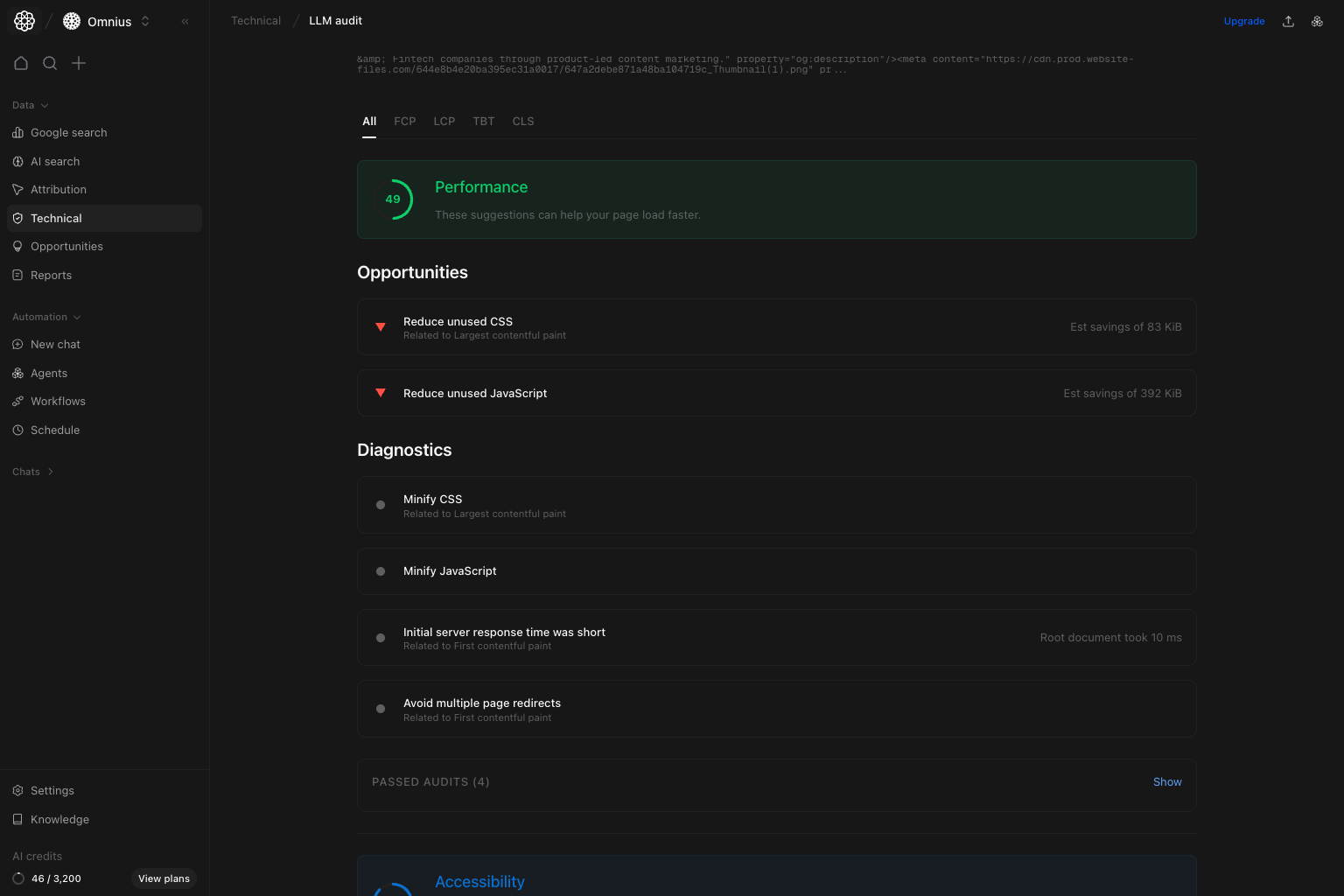 This block helps you verify what the crawler sees and where speed is lost.
What’s included:
* `Initial HTML preview` for source-level inspection.
* Score panel with tab views:
* `All`
* `FCP`
* `LCP`
* `TBT`
* `CLS`
* `Opportunities` with estimated savings.
* `Diagnostics` with implementation details.
What to do:
* Start with the highest estimated savings items.
* Fix render-blocking CSS/JS issues first.
* Track if performance changes improve both UX and crawl efficiency.
Quick definitions:
* `FCP` (First Contentful Paint): time until first visible content appears.
* `LCP` (Largest Contentful Paint): time until the main content block appears.
* `TBT` (Total Blocking Time): how long scripts block user interaction.
* `CLS` (Cumulative Layout Shift): visual instability while the page loads.
## 5) Accessibility and best-practices findings
This block helps you verify what the crawler sees and where speed is lost.
What’s included:
* `Initial HTML preview` for source-level inspection.
* Score panel with tab views:
* `All`
* `FCP`
* `LCP`
* `TBT`
* `CLS`
* `Opportunities` with estimated savings.
* `Diagnostics` with implementation details.
What to do:
* Start with the highest estimated savings items.
* Fix render-blocking CSS/JS issues first.
* Track if performance changes improve both UX and crawl efficiency.
Quick definitions:
* `FCP` (First Contentful Paint): time until first visible content appears.
* `LCP` (Largest Contentful Paint): time until the main content block appears.
* `TBT` (Total Blocking Time): how long scripts block user interaction.
* `CLS` (Cumulative Layout Shift): visual instability while the page loads.
## 5) Accessibility and best-practices findings
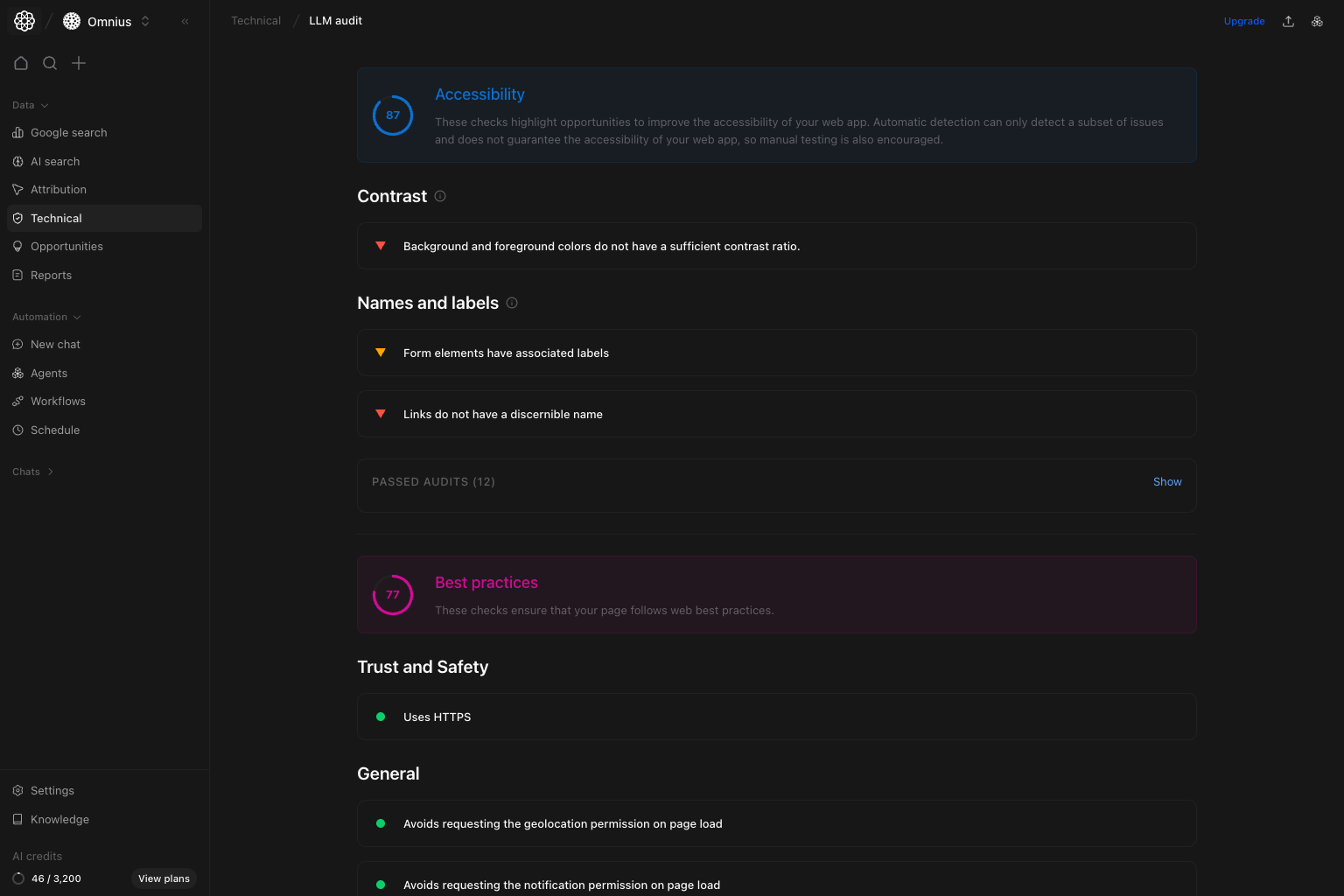 This section highlights structural quality and implementation hygiene.
What’s included:
* `Accessibility` checks (for example `Contrast`, `Names and labels`).
* `Best practices` checks:
* `Trust and Safety`
* `General`
What to do:
* Resolve contrast and labeling issues that block readability and machine interpretation.
* Fix recurring best-practice warnings to reduce technical fragility.
* Re-run audits after changes to confirm warning reduction.
## 6) SEO, content, and crawling/indexing checks
This section highlights structural quality and implementation hygiene.
What’s included:
* `Accessibility` checks (for example `Contrast`, `Names and labels`).
* `Best practices` checks:
* `Trust and Safety`
* `General`
What to do:
* Resolve contrast and labeling issues that block readability and machine interpretation.
* Fix recurring best-practice warnings to reduce technical fragility.
* Re-run audits after changes to confirm warning reduction.
## 6) SEO, content, and crawling/indexing checks
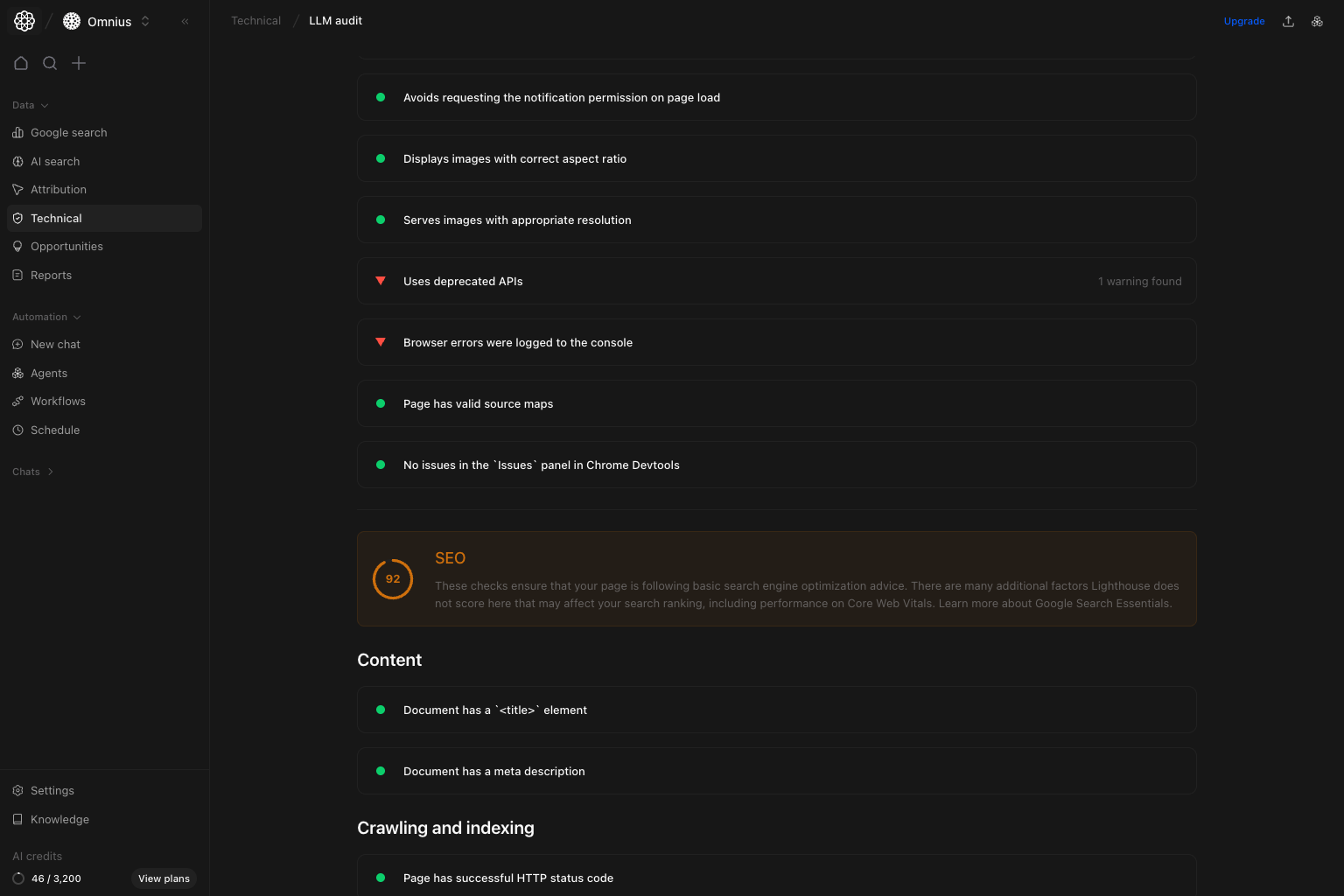 This section is your final validation layer before closing a run.
What’s included:
* `SEO` score and related checks.
* `Content` checks (title, description, and other core signals).
* `Crawling and indexing` checks (status/response-level validations).
What to do:
* Confirm core SEO and metadata checks pass on important pages.
* Fix crawl/index warnings before scaling content output.
* Use this section to verify technical readiness after implementation.
## If you see this, do this next
| What you see in the report | What it usually means | What to do next |
| ---------------------------------------- | ------------------------------------------------- | ------------------------------------------------------------------- |
| `robots.txt` or `Sitemap` is not valid | AI crawlers cannot access or trust your crawl map | Fix crawl directives and sitemap first |
| Entity trust score is low | Important trust schema is missing | Add `Organization`, `Article`, and `BreadcrumbList` schema first |
| Readability is low | Content is hard to parse and summarize | Simplify language and improve section structure |
| `LCP`/`TBT` problems in performance tabs | Rendering path is heavy | Remove blocking CSS/JS and optimize loading order |
| Accessibility warnings stay high | Structural quality debt remains | Fix labels, contrast, and semantic structure before scale |
| SEO/content checks fail | Core metadata/indexability issues remain | Resolve title/description/index checks before publishing more pages |
## Quick weekly checklist
1. Review list-view score direction.
2. Open latest audit details and verify crawlability first.
3. Prioritize entity/schema and content-structure gaps.
4. Fix top Lighthouse opportunities and accessibility warnings.
5. Validate SEO/content/crawling checks before marking complete.
## What to fix first
| Pattern in LLM audit | What it usually means | Recommended action |
| ---------------------------------------------- | ------------------------------------------------- | ----------------------------------------------------- |
| Crawlability status fails (`robots`/`sitemap`) | AI engines cannot access content correctly | Fix access rules and sitemap integrity first |
| Entity trust score is low | Structured trust signals are missing | Add/fix Organization, Article, FAQ, Breadcrumb schema |
| Readability low, entity coverage weak | Content is hard to parse semantically | Simplify language and strengthen entity-rich sections |
| Performance opportunities remain high | Technical performance debt affects render quality | Implement highest-savings fixes first |
| SEO/content checks pass but visibility is weak | Off-page and prompt-level coverage gap | Pair fixes with AI Search prompt and citation work |
## Team routine
1. Weekly: run list review + one detailed audit deep dive.
2. Bi-weekly: validate whether shipped fixes changed detail checks.
3. Monthly: report recurring technical blockers and closure rate.
## Keep in mind
* One score alone is not enough; read section-level diagnostics.
* Not every warning has equal impact. Prioritize crawlability and trust signals first.
* High classic SEO quality does not automatically mean strong AI discoverability.
## Where to go next
* [AI Search visibility](/data/ai-search/visibility)
* [Technical overview](/data/technical/overview)
* [SEO audit](/data/technical/seo-audit)
This section is your final validation layer before closing a run.
What’s included:
* `SEO` score and related checks.
* `Content` checks (title, description, and other core signals).
* `Crawling and indexing` checks (status/response-level validations).
What to do:
* Confirm core SEO and metadata checks pass on important pages.
* Fix crawl/index warnings before scaling content output.
* Use this section to verify technical readiness after implementation.
## If you see this, do this next
| What you see in the report | What it usually means | What to do next |
| ---------------------------------------- | ------------------------------------------------- | ------------------------------------------------------------------- |
| `robots.txt` or `Sitemap` is not valid | AI crawlers cannot access or trust your crawl map | Fix crawl directives and sitemap first |
| Entity trust score is low | Important trust schema is missing | Add `Organization`, `Article`, and `BreadcrumbList` schema first |
| Readability is low | Content is hard to parse and summarize | Simplify language and improve section structure |
| `LCP`/`TBT` problems in performance tabs | Rendering path is heavy | Remove blocking CSS/JS and optimize loading order |
| Accessibility warnings stay high | Structural quality debt remains | Fix labels, contrast, and semantic structure before scale |
| SEO/content checks fail | Core metadata/indexability issues remain | Resolve title/description/index checks before publishing more pages |
## Quick weekly checklist
1. Review list-view score direction.
2. Open latest audit details and verify crawlability first.
3. Prioritize entity/schema and content-structure gaps.
4. Fix top Lighthouse opportunities and accessibility warnings.
5. Validate SEO/content/crawling checks before marking complete.
## What to fix first
| Pattern in LLM audit | What it usually means | Recommended action |
| ---------------------------------------------- | ------------------------------------------------- | ----------------------------------------------------- |
| Crawlability status fails (`robots`/`sitemap`) | AI engines cannot access content correctly | Fix access rules and sitemap integrity first |
| Entity trust score is low | Structured trust signals are missing | Add/fix Organization, Article, FAQ, Breadcrumb schema |
| Readability low, entity coverage weak | Content is hard to parse semantically | Simplify language and strengthen entity-rich sections |
| Performance opportunities remain high | Technical performance debt affects render quality | Implement highest-savings fixes first |
| SEO/content checks pass but visibility is weak | Off-page and prompt-level coverage gap | Pair fixes with AI Search prompt and citation work |
## Team routine
1. Weekly: run list review + one detailed audit deep dive.
2. Bi-weekly: validate whether shipped fixes changed detail checks.
3. Monthly: report recurring technical blockers and closure rate.
## Keep in mind
* One score alone is not enough; read section-level diagnostics.
* Not every warning has equal impact. Prioritize crawlability and trust signals first.
* High classic SEO quality does not automatically mean strong AI discoverability.
## Where to go next
* [AI Search visibility](/data/ai-search/visibility)
* [Technical overview](/data/technical/overview)
* [SEO audit](/data/technical/seo-audit)