> ## Documentation Index
> Fetch the complete documentation index at: https://docs.atomicagi.com/llms.txt
> Use this file to discover all available pages before exploring further.

# Technical Overview

> See technical health across SEO, AI readiness, and indexing so you can prioritize fixes faster

<Frame>
  <img src="https://mintcdn.com/atomicai/66wBloPCX-icbC_a/images/data/technical/app-technical-overview.png?fit=max&auto=format&n=66wBloPCX-icbC_a&q=85&s=c4abe877cd74fc6f185fbbddff893bab" alt="Technical overview with SEO audit, LLM audit, URL indexing cards, and action shortcuts" width="1440" height="1000" data-path="images/data/technical/app-technical-overview.png" />
</Frame>

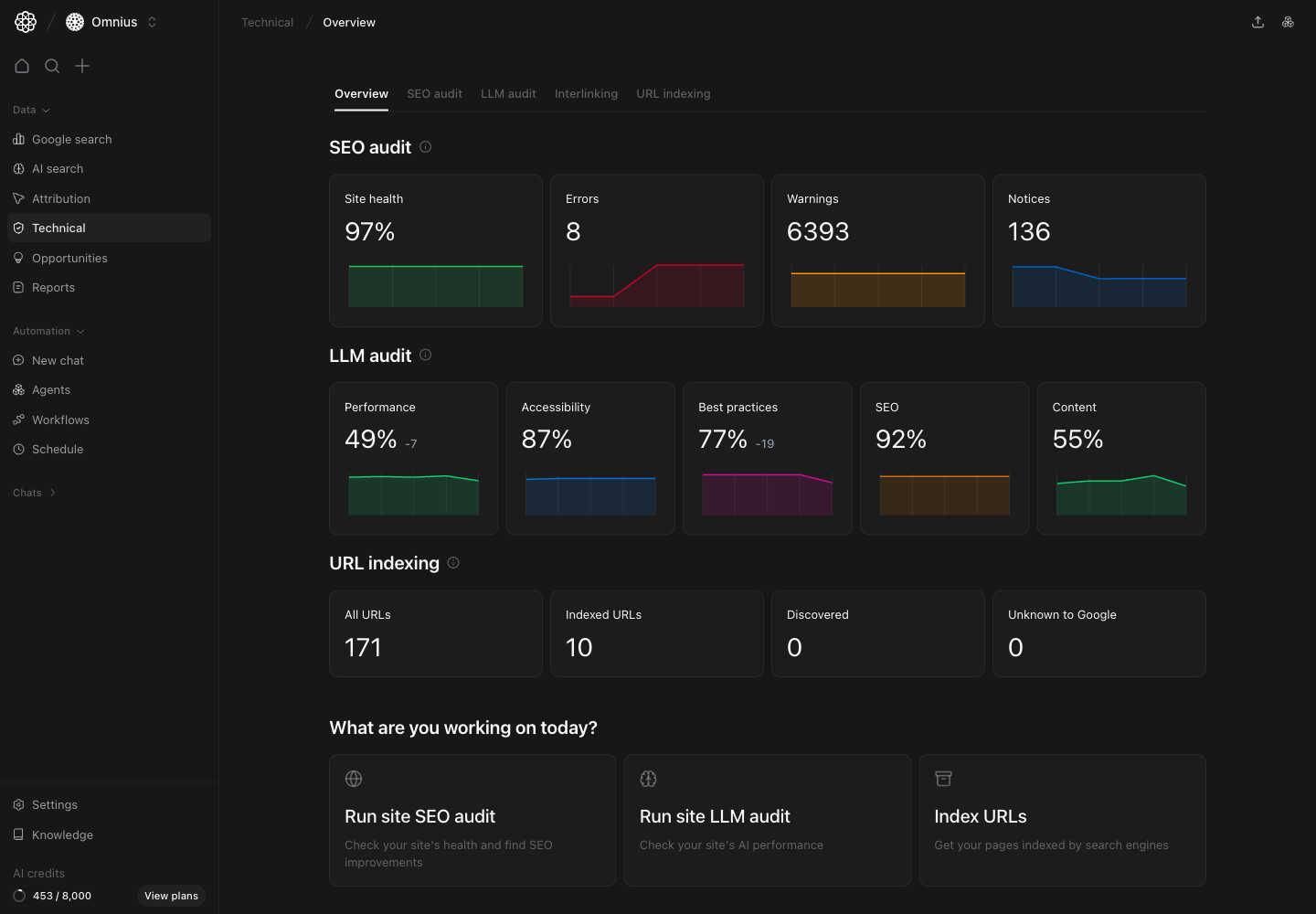
Use this page as your technical control center. It helps you decide where to focus first before opening deeper Technical tabs.

<div className="atomic-info-callout">
  <p>
    <strong>Important:</strong> Evaluate trend direction, not one isolated score
    snapshot.
  </p>
</div>

## Questions this page should answer

1. Is overall site health improving or getting worse?
2. Is the current risk mainly from SEO issues, AI-readiness gaps, or indexing problems?
3. Which technical workflow should the team run next?

## Before you analyze

* Keep the same date range you use in Search and Attribution reviews.
* Start with no assumptions and check all three blocks: `SEO audit`, `LLM audit`, and `URL indexing`.
* Compare current values with the prior period before assigning work.

## What this page gives you

* A top-level snapshot of your technical health across crawl quality, AI-readiness, and indexing.
* Fast access to the main execution views: `SEO audit`, `LLM audit`, `Interlinking`, `Cannibalization`, and `URL indexing`.
* Action shortcuts so teams can launch technical work directly from the overview.

## How to read the top cards

Read the overview blocks in this order:

1. `SEO audit`: crawl health and issue pressure (`Errors`, `Warnings`, `Notices`).
2. `LLM audit`: readiness for AI engines (`Performance`, `Accessibility`, `Best practices`, `SEO`, `Content`).
3. `URL indexing`: discoverability and indexing coverage (`All URLs`, `Indexed URLs`, `Discovered`, `Unknown to Google`).

Use this rule:

* If `Errors` are rising, start with `SEO audit`.
* If `Content` or `Performance` is weak in LLM metrics, move to `LLM audit`.
* If indexed coverage is low or unknown URLs increase, move to `URL indexing`.
<div className="atomic-highlight-card">
  <p>
    <strong>Key signal:</strong> Pick one primary technical workflow per review
    cycle. Parallel fixes across all three areas usually slow execution and hide
    impact.
  </p>
</div>

## How these metrics are calculated (simple)

### Site health

```text theme={null}
Site health = 100 - Weighted issue severity impact from current technical findings
```

### LLM category scores

LLM category scores are weighted pass rates for checks in each category, shown on a `0-100` scale.

### Indexing status cards

Status cards are direct counts of tracked URLs in each indexing state.

## SEO audit section

This block shows whether technical SEO issues are controlled or spreading.

What to watch:

* `Site health` trend direction.
* Spikes in `Errors`.
* Large `Warnings` volume that can become future errors.

If error pressure is growing, open [SEO audit](/data/technical/seo-audit) immediately.

## LLM audit section

This block tells you if your site is structurally ready for AI answer engines.

What to watch:

* `Content` and `Performance` scores first.
* Any category with repeated decline across audits.
* Gaps between classic SEO quality and AI-readiness.

If one category is consistently weak, continue in [LLM audit](/data/technical/llm-audit).

## URL indexing section

This block helps you catch discoverability problems before they hurt growth.

What to watch:

* Difference between `All URLs` and `Indexed URLs`.
* Any increase in `Unknown to Google`.
* Stalled discovery for new pages.

If indexed coverage is low for important pages, continue in [URL indexing](/data/technical/url-indexing).

## Quick weekly checklist

1. Check all three blocks for direction change.
2. Flag the single highest-risk area (SEO issues, LLM quality, or indexing).
3. Open the matching detailed page and create fix tickets.
4. Confirm owners and deadlines for critical technical fixes.
5. Recheck trend change after updates are shipped.

## What to fix first

| Pattern on overview                  | What it usually means                        | Recommended action                                 |
| ------------------------------------ | -------------------------------------------- | -------------------------------------------------- |
| Errors rising in SEO audit           | Crawl quality is degrading                   | Open SEO audit and fix critical issues first       |
| Low LLM content/performance          | AI engines may struggle with content quality | Prioritize LLM audit recommendations for key pages |
| Indexed URLs lag far behind all URLs | Discoverability/indexing bottleneck          | Run URL indexing checks and submit important pages |
| Multiple sections decline together   | Technical debt is systemic                   | Run cross-functional technical sprint              |

## Team routine

1. Weekly: monitor technical direction and assign highest-risk fixes.
2. Bi-weekly: review progress in each detailed Technical page.
3. Monthly: report resolved issues and remaining structural risks.

## Keep in mind

* A high health score can still hide critical issues in a few key pages.
* AI-readiness and indexing are not automatic by-products of classic SEO.
* Trends matter more than one-day values.

## Where to go next

* [SEO audit](/data/technical/seo-audit)
* [LLM audit](/data/technical/llm-audit)
* [Interlinking](/data/technical/interlinking)
* [Cannibalization](/data/technical/cannibalization)
* [URL indexing](/data/technical/url-indexing)
