> ## Documentation Index
> Fetch the complete documentation index at: https://docs.atomicagi.com/llms.txt
> Use this file to discover all available pages before exploring further.
# Home
> Choose the next investigation from your project performance and shortcuts.
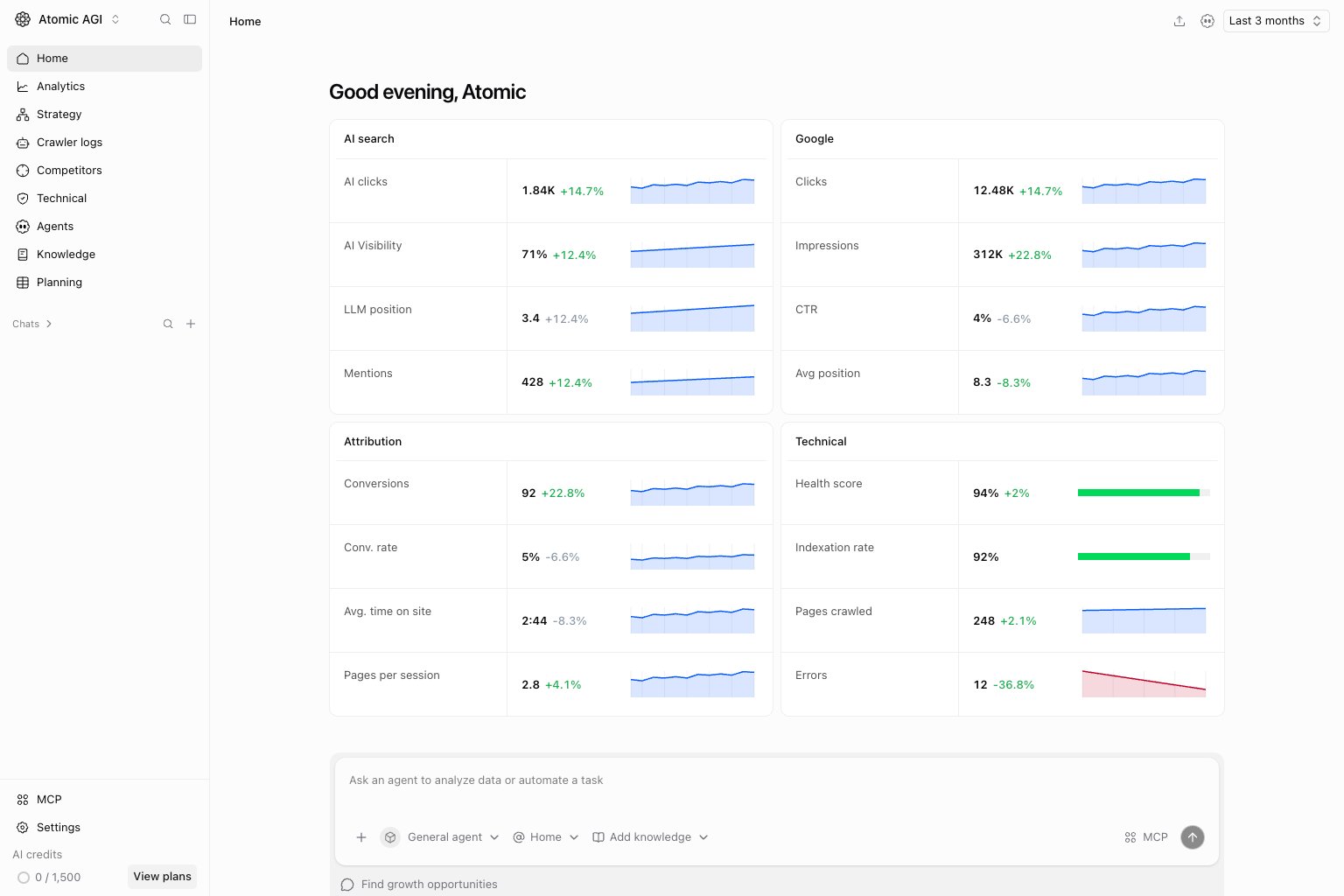 Home brings AI search, Google search, attribution, and technical health together. Open the project name in the sidebar to confirm which project you are reviewing before acting on a change.
## Read the performance cards
Choose a date range, then compare the current result with the comparison period. AI clicks describe visits attributed to AI sources; AI Visibility describes brand presence in tracked AI answers. They measure different parts of the journey.
Google clicks, impressions, CTR, and average position describe search performance. Attribution connects visits to conversions and engagement. Technical health shows crawl and indexing results when those sources are available. A missing connection or unavailable metric is not evidence of zero performance.
## Investigate a change
Select `View all` on the relevant card to open its detailed analytics. Narrow by page, source, country, or device before deciding whether the change affects the whole site. Use the agent composer to ask a question with Home context, and check the underlying data in its answer.
## Use project shortcuts
Open Planning for tasks and priorities, Competitors for content gaps, or MCP for connection settings. Run an SEO audit when you need a fresh site check and have permission. Shortcuts and write actions depend on project permissions and plan access.
## Where to go next
* [Analytics overview](/data/overview)
* [Planning](/planning/overview)
* [Agents](/automation/agents/overview)
This documentation is built and hosted on [Mintlify](https://mintlify.com), a developer documentation platform.
Home brings AI search, Google search, attribution, and technical health together. Open the project name in the sidebar to confirm which project you are reviewing before acting on a change.
## Read the performance cards
Choose a date range, then compare the current result with the comparison period. AI clicks describe visits attributed to AI sources; AI Visibility describes brand presence in tracked AI answers. They measure different parts of the journey.
Google clicks, impressions, CTR, and average position describe search performance. Attribution connects visits to conversions and engagement. Technical health shows crawl and indexing results when those sources are available. A missing connection or unavailable metric is not evidence of zero performance.
## Investigate a change
Select `View all` on the relevant card to open its detailed analytics. Narrow by page, source, country, or device before deciding whether the change affects the whole site. Use the agent composer to ask a question with Home context, and check the underlying data in its answer.
## Use project shortcuts
Open Planning for tasks and priorities, Competitors for content gaps, or MCP for connection settings. Run an SEO audit when you need a fresh site check and have permission. Shortcuts and write actions depend on project permissions and plan access.
## Where to go next
* [Analytics overview](/data/overview)
* [Planning](/planning/overview)
* [Agents](/automation/agents/overview)
This documentation is built and hosted on [Mintlify](https://mintlify.com), a developer documentation platform.