> ## Documentation Index
> Fetch the complete documentation index at: https://docs.atomicagi.com/llms.txt
> Use this file to discover all available pages before exploring further.
# AI Agent Settings
> Manage project-level BYOK provider keys so agents can use the right model credentials for this project
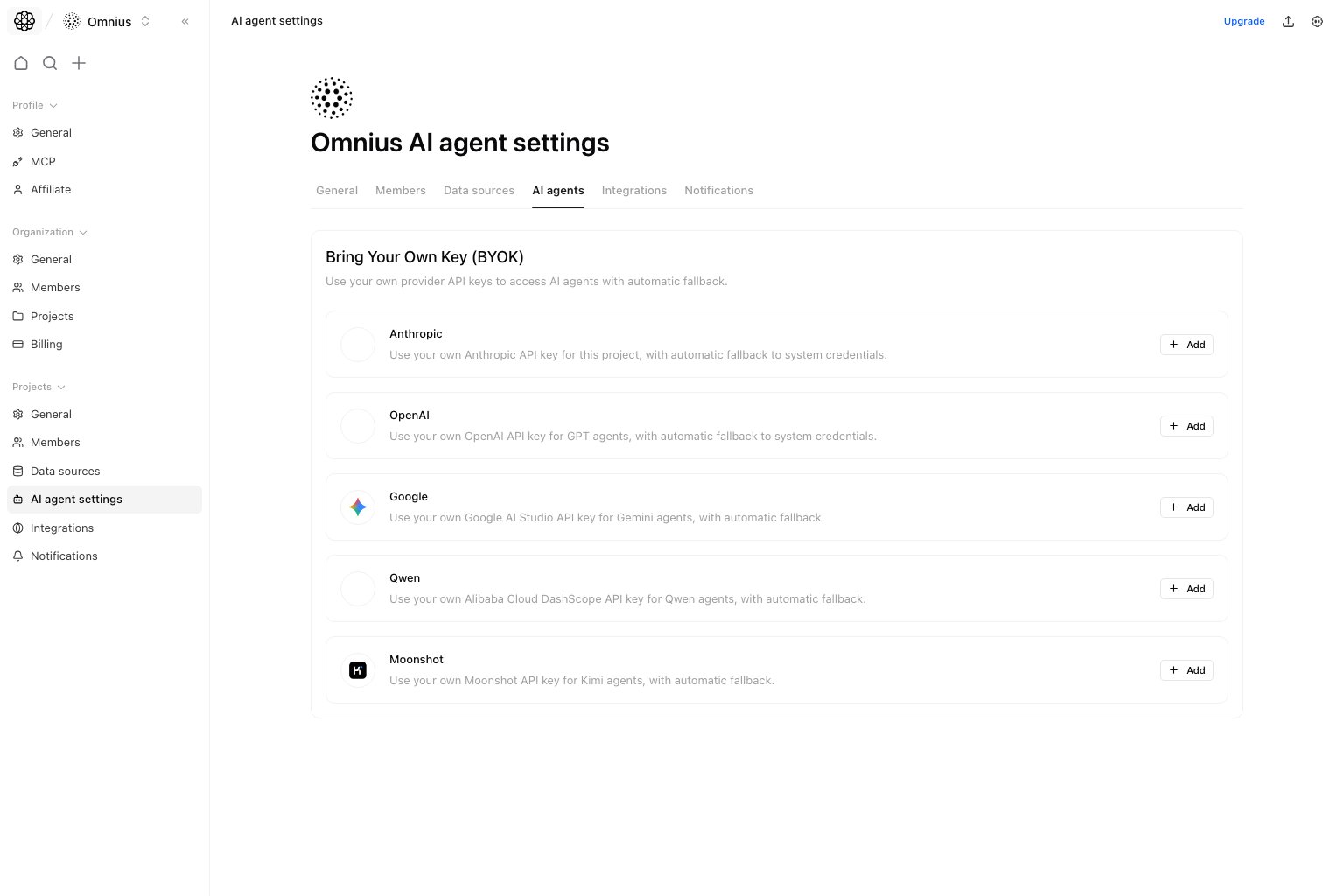 Use this page to manage project-specific AI provider keys. It is the place for bring-your-own-key setups that should apply only to this project.
## Questions this page should answer
1. Which providers are configured for this project?
2. Which provider keys are enabled right now?
3. When should we use project keys instead of system credentials?
## Before you configure keys
* Confirm this project actually needs bring-your-own-key behavior.
* Decide who owns key rotation and billing for the provider account.
* Check whether the provider account supports the models your agents need.
* Keep the key available only long enough to paste it into Atomic.
## What this page gives you
* Provider cards for supported BYOK setups.
* Configure, enable, disable, test, edit, and delete actions.
* Automatic fallback behavior when project keys are not enabled.
## Providers currently supported
* `Anthropic`
* `OpenAI`
* `Google`
* `Qwen`
* `Moonshot`
## How to use this page
### Configure only the providers you actually need
Do not add every possible key by default. Add the providers required for the models or policies this project really uses.
### Test before enabling at scale
Save and test the key before relying on it in production workflows. A key can be configured but still wrong for the model or account you expect.
### Leave fallback behavior intentional
If a project needs strict provider isolation, confirm which keys are enabled and who owns rotation. If fallback is acceptable, document that decision internally.
## How to know setup worked
* The provider card shows the configured state you expect.
* The key test succeeds after saving.
* Agents that use the provider can complete a small test request.
* Errors mention prompt/model issues rather than authentication or provider access.
## Quick monthly checklist
1. Confirm each enabled key still has an owner.
2. Re-test keys after provider account or billing changes.
3. Disable providers this project no longer uses.
4. Rotate keys according to your security policy.
## What to fix first
| Pattern in AI Agent settings | What it usually means | Recommended action |
| ---------------------------------- | ------------------------------------ | ---------------------------------------------------- |
| Key saves but test fails | Provider credential or account issue | Re-check key value, account status, and model access |
| Agent errors mention auth/provider | Project key is invalid or disabled | Re-test and update the provider card |
| Multiple unused providers enabled | Configuration is broader than needed | Disable unused keys to reduce operational risk |
| Outputs changed after key rotation | Model/provider behavior may differ | Run a small comparison test before scaling usage |
## Keep in mind
* These keys are project-scoped, not workspace-global.
* Key rotation should be followed by a quick re-test.
* A configured key is not the same as an enabled key.
## Where to go next
* [Agents](/automation/agents/overview)
* [Teams](/automation/teams/overview)
* [Project Integrations](/settings/project/integrations)
* [Project Notifications](/settings/project/notifications)
Use this page to manage project-specific AI provider keys. It is the place for bring-your-own-key setups that should apply only to this project.
## Questions this page should answer
1. Which providers are configured for this project?
2. Which provider keys are enabled right now?
3. When should we use project keys instead of system credentials?
## Before you configure keys
* Confirm this project actually needs bring-your-own-key behavior.
* Decide who owns key rotation and billing for the provider account.
* Check whether the provider account supports the models your agents need.
* Keep the key available only long enough to paste it into Atomic.
## What this page gives you
* Provider cards for supported BYOK setups.
* Configure, enable, disable, test, edit, and delete actions.
* Automatic fallback behavior when project keys are not enabled.
## Providers currently supported
* `Anthropic`
* `OpenAI`
* `Google`
* `Qwen`
* `Moonshot`
## How to use this page
### Configure only the providers you actually need
Do not add every possible key by default. Add the providers required for the models or policies this project really uses.
### Test before enabling at scale
Save and test the key before relying on it in production workflows. A key can be configured but still wrong for the model or account you expect.
### Leave fallback behavior intentional
If a project needs strict provider isolation, confirm which keys are enabled and who owns rotation. If fallback is acceptable, document that decision internally.
## How to know setup worked
* The provider card shows the configured state you expect.
* The key test succeeds after saving.
* Agents that use the provider can complete a small test request.
* Errors mention prompt/model issues rather than authentication or provider access.
## Quick monthly checklist
1. Confirm each enabled key still has an owner.
2. Re-test keys after provider account or billing changes.
3. Disable providers this project no longer uses.
4. Rotate keys according to your security policy.
## What to fix first
| Pattern in AI Agent settings | What it usually means | Recommended action |
| ---------------------------------- | ------------------------------------ | ---------------------------------------------------- |
| Key saves but test fails | Provider credential or account issue | Re-check key value, account status, and model access |
| Agent errors mention auth/provider | Project key is invalid or disabled | Re-test and update the provider card |
| Multiple unused providers enabled | Configuration is broader than needed | Disable unused keys to reduce operational risk |
| Outputs changed after key rotation | Model/provider behavior may differ | Run a small comparison test before scaling usage |
## Keep in mind
* These keys are project-scoped, not workspace-global.
* Key rotation should be followed by a quick re-test.
* A configured key is not the same as an enabled key.
## Where to go next
* [Agents](/automation/agents/overview)
* [Teams](/automation/teams/overview)
* [Project Integrations](/settings/project/integrations)
* [Project Notifications](/settings/project/notifications)