

Questions this page should answer
- Which pages have weak internal-link support?
- Which important pages are not receiving enough incoming links?
- Where should we add internal links first to improve discoverability?
Before you analyze
- Start with high-value page groups (commercial and core category pages).
- Sort by
Scoreand check low-score pages first. - Check both views (
TableandMind map) before final prioritization.
What this page gives you
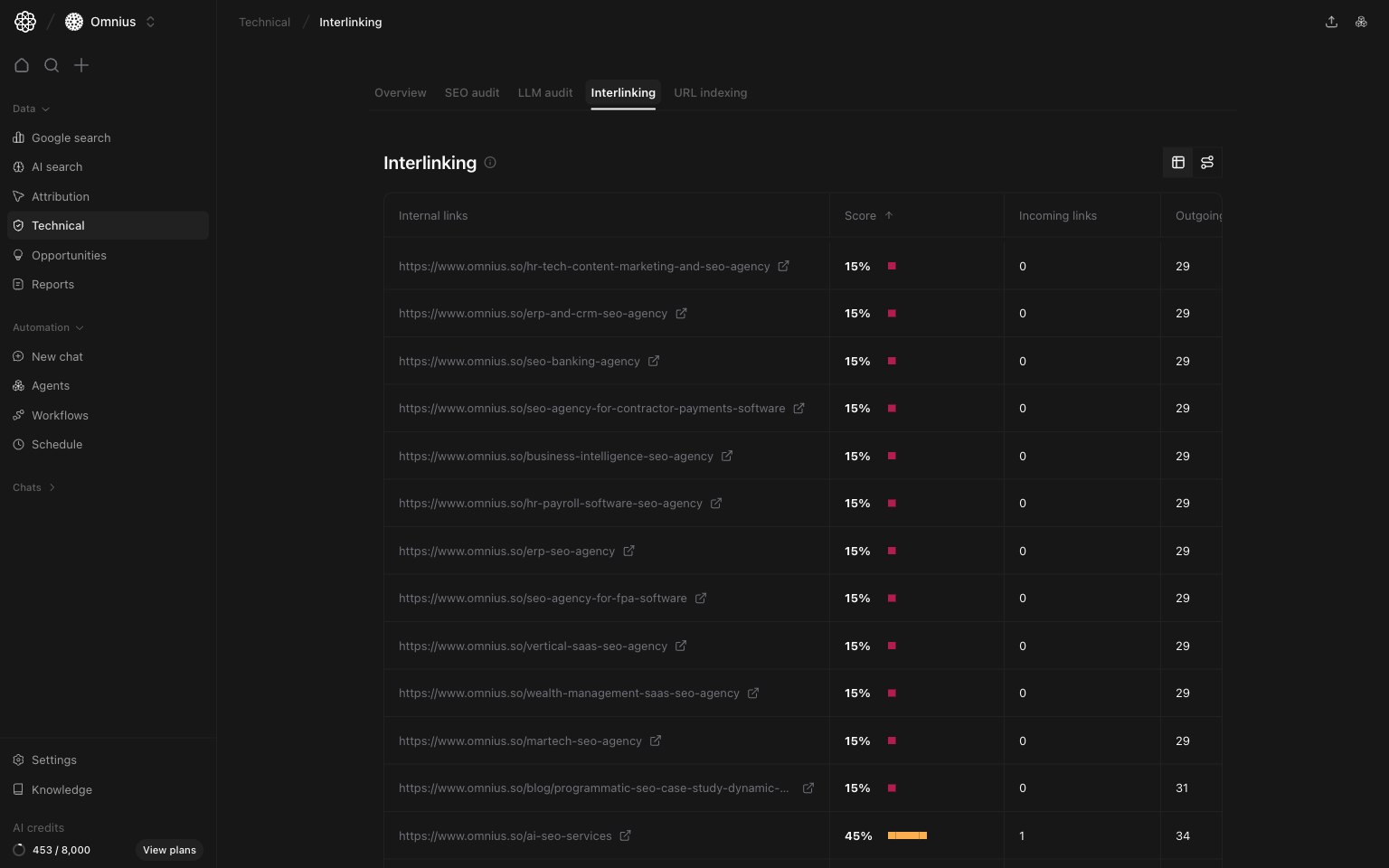
- Two views of the same internal-link dataset:
Tableview for page-level prioritizationMind mapview for structure and cluster analysis
- URL-level metrics:
ScoreIncoming linksOutgoing links
- Clickable nodes in mind map to inspect incoming and outgoing relationships.
How the Interlinking page is organized
The top-right view toggle switches between:Tableicon: row-level internal-link healthMind mapicon: network-style structure view
- Start in
Tableto identify weak pages. - Switch to
Mind mapto see why those pages are weak structurally. - Build fix tickets based on both row metrics and graph context.
Table view: prioritize pages by link health
This is your execution view for weekly link fixes. What each column means:Score: link health indicator for the page.Incoming links: how many internal pages support this URL.Outgoing links: how many internal paths this page gives to others.
- Low score + very low incoming links means discoverability risk.
- High outgoing with low incoming can mean a page gives value but receives little support.
- Many pages with similar low score in one folder usually means a structural linking gap.
- Low
Score+ lowIncoming links:- page is likely under-discoverable and under-supported.
- High
Incoming links+ lowOutgoing links:- page receives equity but does not distribute it.
- Good
Scorebut weak commercial impact:- check link source relevance, not only count.
Mind map view: diagnose structure, clusters, and dead ends
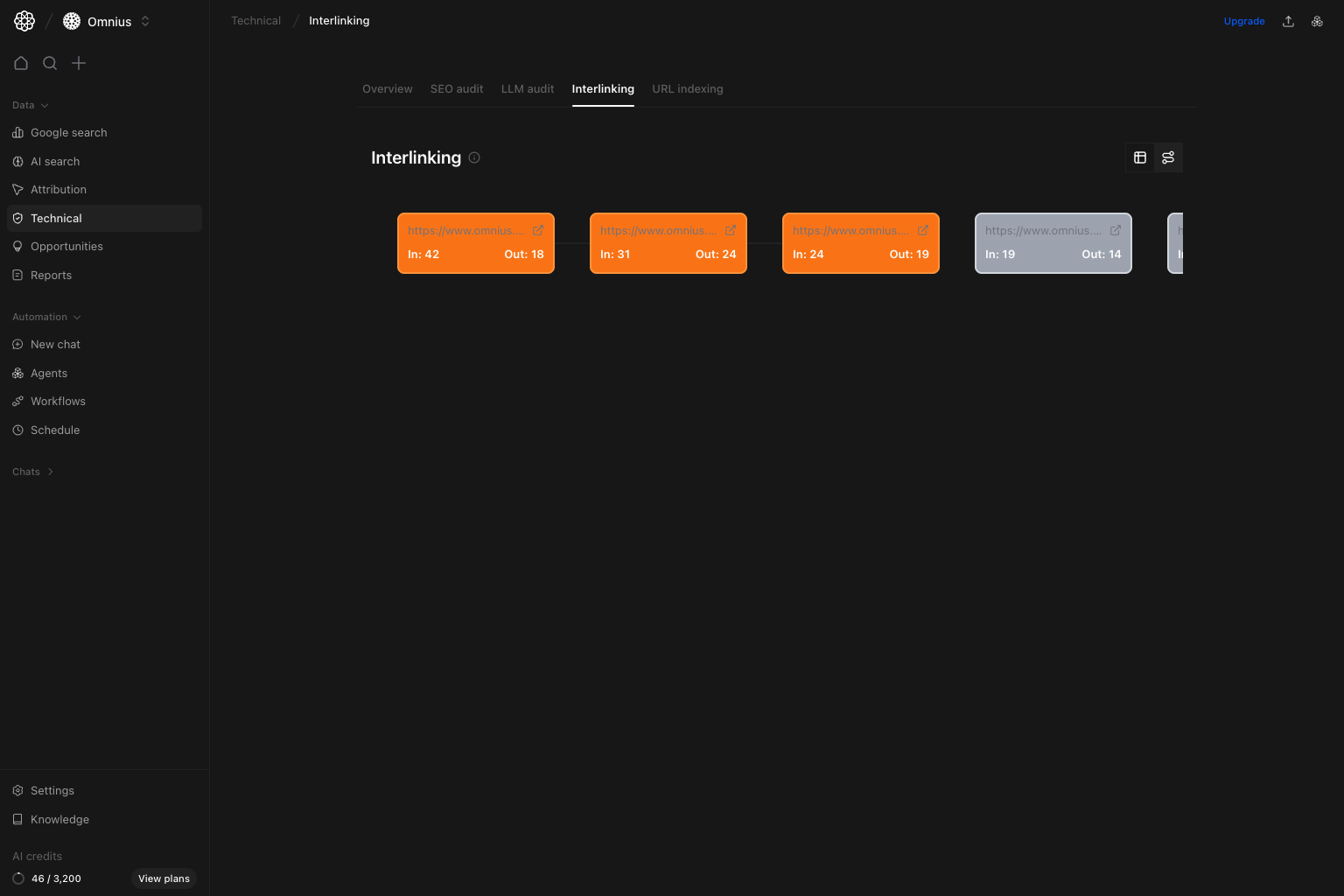
- Each card is a URL node.
In:is incoming internal links to that URL.Out:is outgoing links from that URL.- Connecting lines show internal-link paths between levels.
- Node color reflects relative support strength (more incoming links = stronger node).
- Drag to pan across the network.
- Use
Show more / Show lesscontrols per level to expand dense layers. - Click any node to open detailed incoming/outgoing relationship lists.
- Isolated nodes:
- usually orphan-like pages with weak internal distribution.
- Tight clusters with few bridges:
- strong local linking but weak cross-cluster authority flow.
- One dominant hub with many dependents:
- concentration risk if hub weakens or is de-prioritized.
Practical workflow: table first, mind map second
Use this order:- Fix low-score commercial pages.
- Fix low-score category and hub pages.
- Switch to mind map and verify each priority page has strong path support.
- Add links from high-authority hubs to isolated or weak nodes.
- Re-check table scores after publishing.
Quick weekly checklist
- Sort by lowest
Score. - Identify pages with weak
Incoming links. - Validate weak pages in
Mind mapto confirm structural gaps. - Add contextual links from stronger, relevant pages.
- Verify anchor text quality and topical match.
- Recheck both views after updates are published.
What to fix first
Team routine
- Weekly: Review low-score rows and publish link fixes.
- Bi-weekly: Review mind map cluster health and bridge coverage.
- Monthly: Track score lift, incoming-link distribution, and affected traffic.
Keep in mind
- Raw link count is not enough. Relevance and context matter most.
- Template-wide/footer links do not replace contextual in-content links.
- Interlinking results are cumulative; judge progress over several weeks.
- Use this page with
Cannibalization,Landing pages, andSEO auditto align fixes with business impact.