

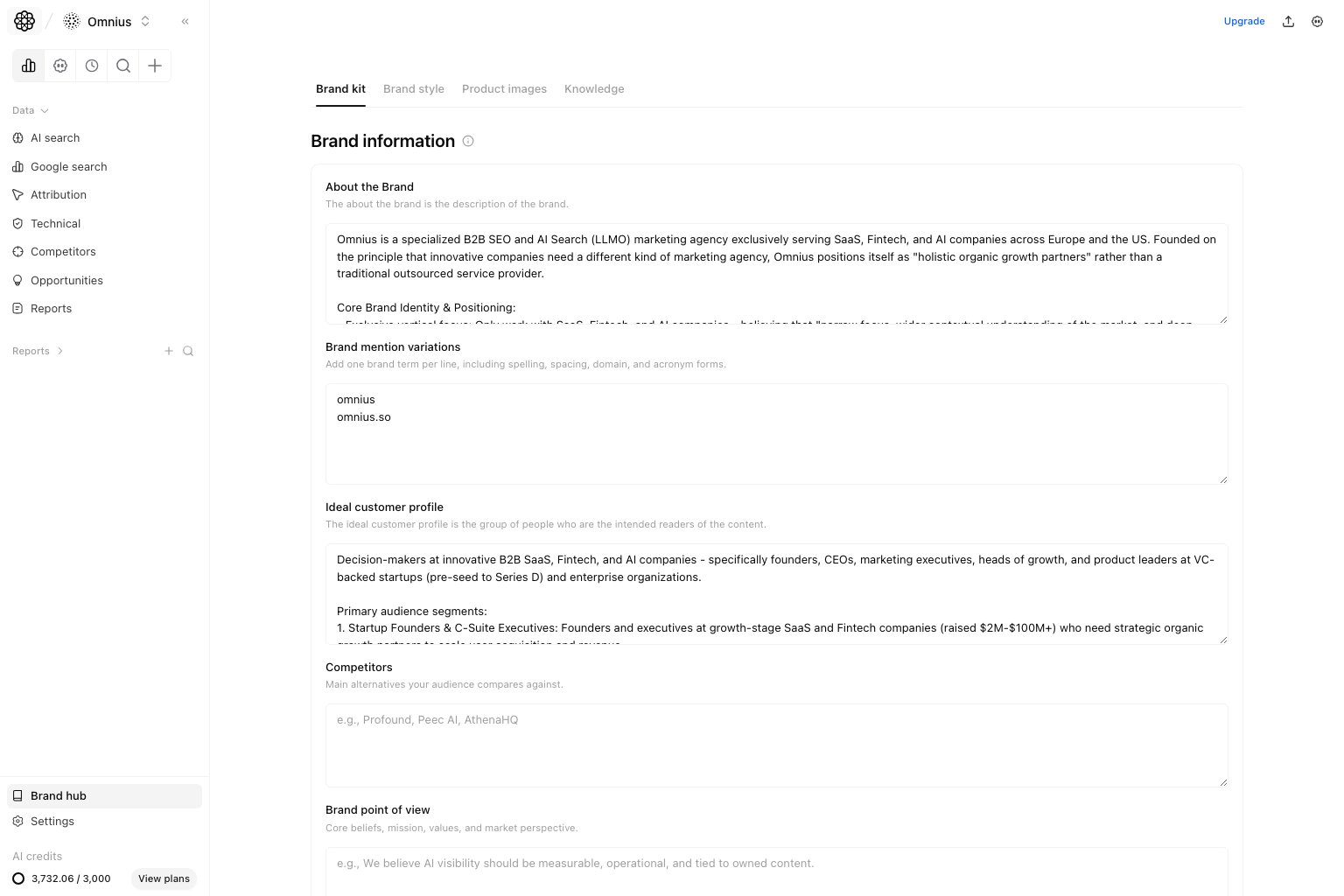
Questions this page should answer
- Which brand kit should agents use for this work?
- Is brand information specific enough for high-quality outputs?
- Do the writing style and sample match the current campaign?
Before you use this page
- In the app, open Project settings and select
Brand kit. - Gather current positioning notes, audience guidance, and style rules.
- Confirm the target country for search analysis.
What this page controls
- Brand kit name and default selection
- Website or domain
About the brandBrand mention variationsIdeal customer profileCompetitorsBrand point of viewAuthor personaTone of voiceUser perspectiveWriting rulesWriting sampleContent featured imagestyle, palette, background wash, layout, typography, and logo defaultsSearch location
What this page gives you
- Reusable brand and writing context for agents and workflows.
- A default brand kit for the current project.
- Domain-assisted generation when you want a researched starting point.
- Image-style defaults for content featured images.
- Search location context for market-specific analysis.
Why this matters
Search locationcontrols market context in AI search tracking.- Brand and audience fields are reused by AI agents and workflows.
- The default brand kit is used by current agent and workflow paths.
- Vague entries lead to generic recommendations and weaker outputs.
How to use this page
Choose or create a brand kit
Use the brand kit selector to switch between saved kits. ClickNew kit to create a manual kit. Mark a kit as default when it should be the main brand guidance for the project.
Generate and save from a domain
Enter a website or domain and clickGenerate and save. Atomic AI opens the predefined Brand Kit agent, researches the site, and saves the researched values with the brand kit tool. Review the saved fields afterward and refine any assumptions that need a human decision.
Write concrete guidance
Use specific statements, examples, and constraints. Avoid broad terms like “professional” without context.Separate identity from style
UseBrand information for who the brand is, who it serves, competitors, and point of view. Use Brand writing style for author persona, tone, perspective, and concrete writing rules.
Add specific writing rules
Capture banned words, capitalization rules, phrases to avoid, punctuation preferences, and other constraints agents should follow.Link a writing sample
Add a writing sample title and URL when you have a published example that shows the desired style.Tune content featured images
UseContent featured image to set the style rules, color mode, palette, logo assets, text placement, and typography for generated blog cover images. Lower Background wash when the background color feels too strong over an inline generated visual.
Keep audience and tone aligned
When your campaign audience changes, update bothIdeal customer profile and Tone of voice together.
Set search location intentionally
Choose the country that matches the market you are measuring. This keeps prompt tracking and analysis aligned.Save after strategic changes
Update this page whenever messaging or positioning changes so new outputs use current guidance.Quick monthly checklist
- Confirm the correct brand kit is marked as default.
- Refresh brand and audience fields after positioning updates.
- Confirm search location still matches your active market.
- Remove old phrasing that no longer fits your messaging.
What to fix first
Keep in mind
- This page defines qualitative context, not indexed page/document sources.
- Brand kits are project-scoped, not organization-global.
- Use Knowledge for long reference documents. Use Brand kit for concise brand and style guidance.