

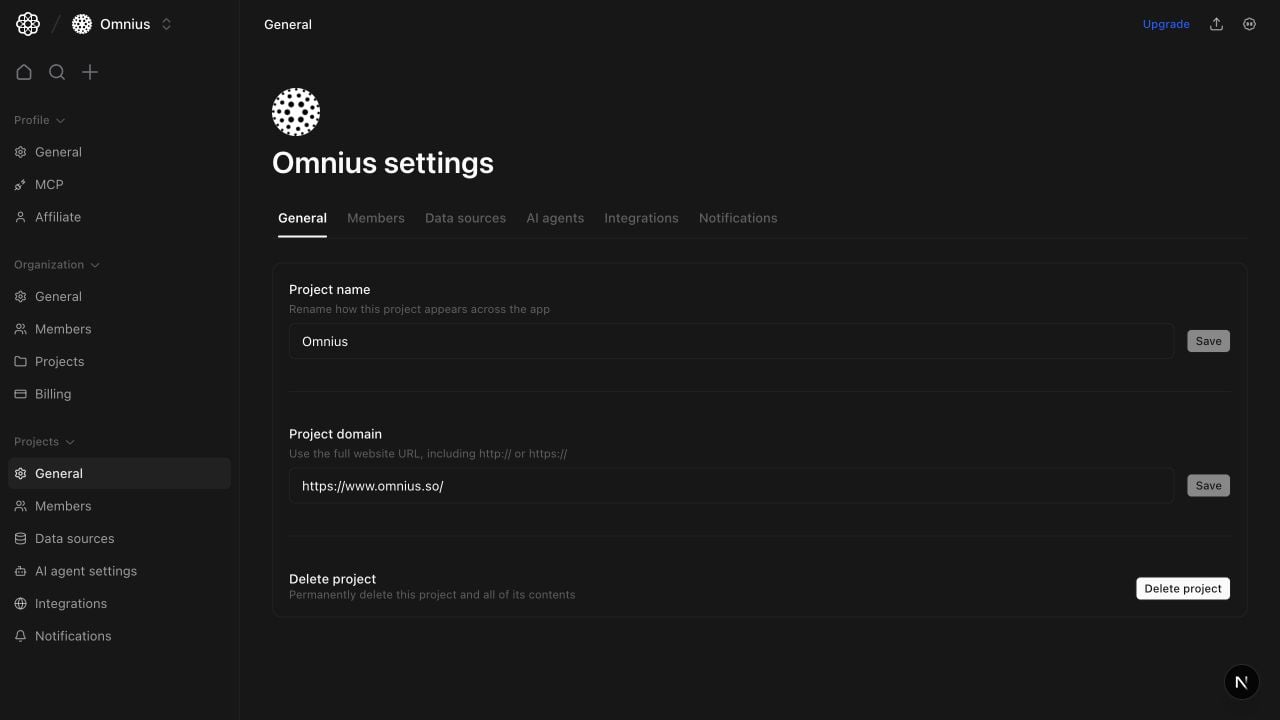
Important: Project identity controls how teams interpret every report. Confirm project and domain before editing nearby settings.
Questions this page should answer
- Do the project name and domain match the current website?
- Do I have the right permission scope for project actions?
- Is project deletion warranted or premature?
Before you use this page
- In the app, open the project you want to edit, then select
Generalin Project settings. - Validate you are editing the intended project before saving identity changes.
- Confirm backup/export expectations before deletion.
What this page controls
- Editable project name and primary domain for members with General settings write access.
Delete projectaction for allowed roles.
What this page gives you
- A project identity check before deeper setup work.
- A clear place for destructive project lifecycle action.
- A reminder that project-level setup belongs in the adjacent project tabs.
How to use this page
Update the project name or domain
Edit the project name or enter the full website URL, includinghttp:// or https://, then select Save beside the field. Each change is saved independently. Atomic stores the domain as an HTTPS host, without www, paths, query parameters, fragments, or ports.
Members without General settings write access can review these values but cannot edit them.
Use delete only for true decommissioning
Deleting a project is destructive; use it only when the project is intentionally retired.Route operational setup to other tabs
Data sources, members, and publishing are configured in their dedicated project tabs.Quick monthly checklist
- Confirm the domain and project name still match live operations.
- Revalidate who can run destructive actions.
- Move routine configuration work to the correct project tabs.
What to fix first
Team routine
- Monthly: confirm project/domain identity.
- Before major audits: verify the correct project is selected.
- Before deletion: confirm downstream data, members, workflows, and reports.
Keep in mind
- Changing the project domain does not reconnect Google Search Console, analytics, or report publishing domains. Review those connections separately when a website moves.
- General is identity/lifecycle, not integrations or analytics config.